
Enhances spawner use with GUI that generates mob drops and experience without spawning entity


How It Works
- Virtual Drops: Spawners generate drops and experience straight into their own storage, without spawning a single mob.
- Player Range: A spawner only works while a player is nearby, like vanilla.
- Inspired by DonutSMP: The spawner style of DonutSMP, on any Paper or Folia server.
Spawner Menu
- One Menu: Right-click a spawner to open its storage, collect its experience and manage its stack.
- Paged Storage: Take single stacks or everything at once, sort by item, and filter out drops a player does not want.
- Selling: Sell the whole storage in one click through a supported shop or economy plugin.
- Layouts: Every slot and text can be changed, and presets such as DonutSMP are included.
| Spawner menu | Storage |
|---|---|
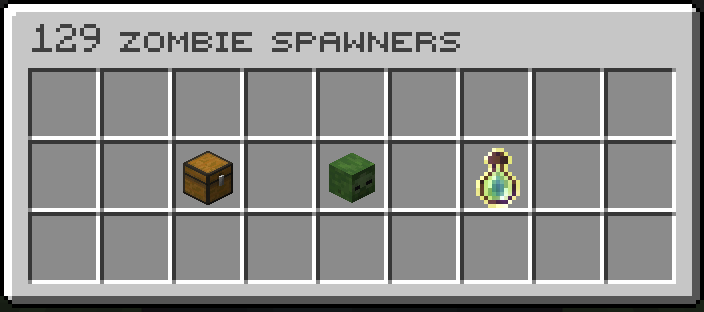 |
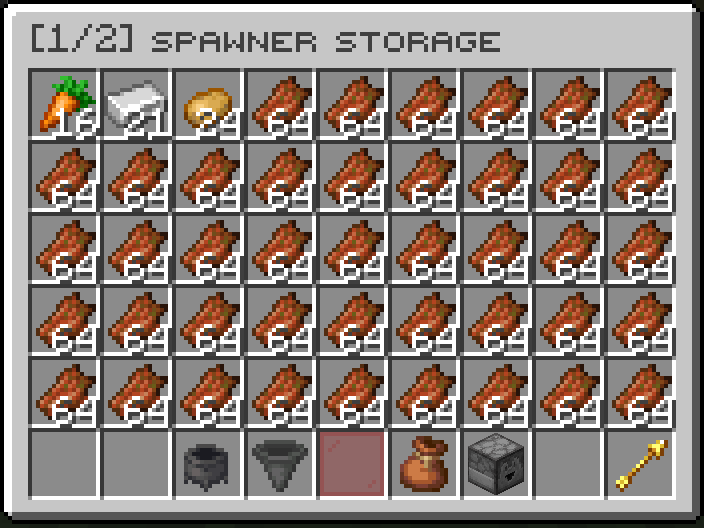 |
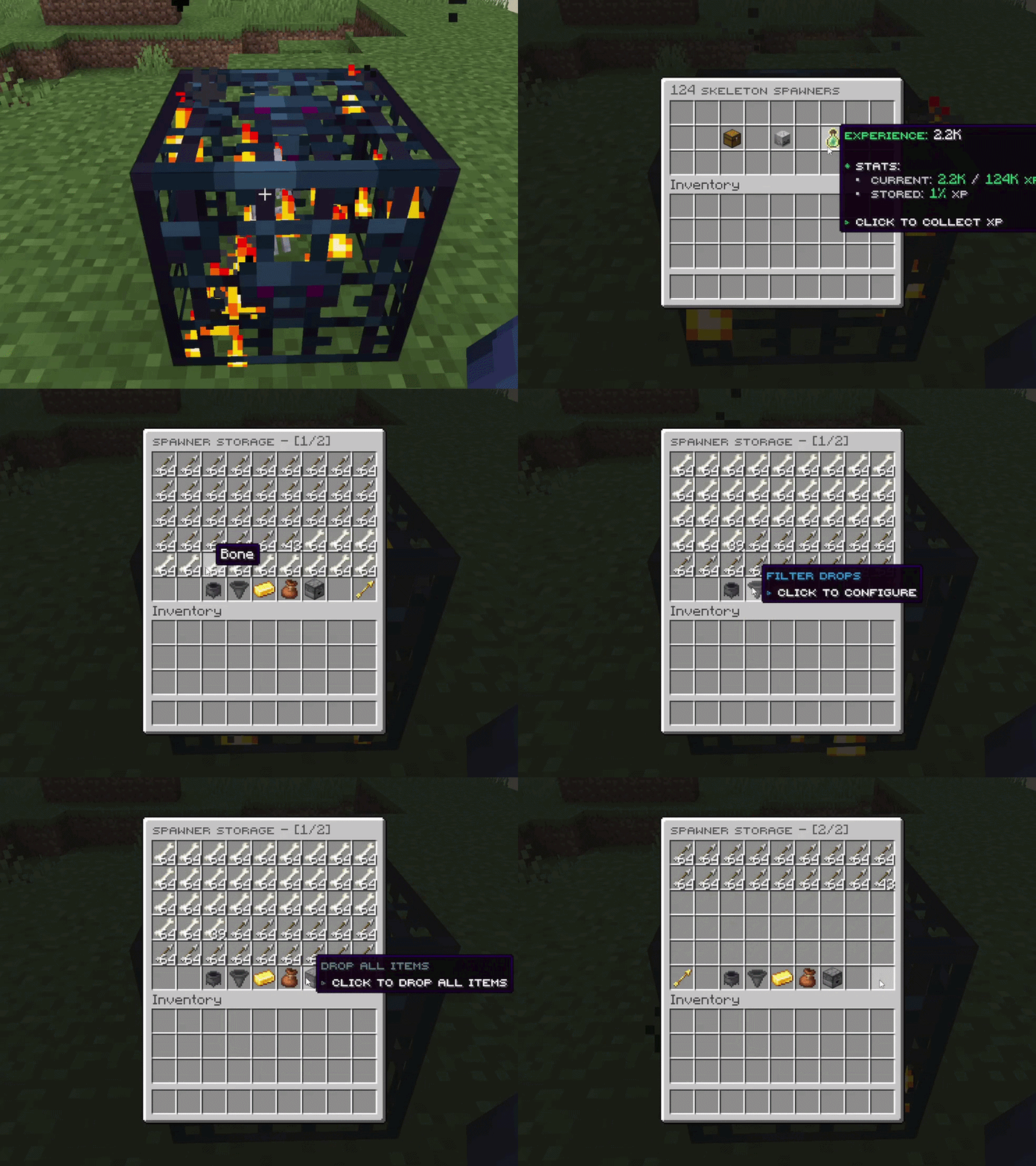
Stacking
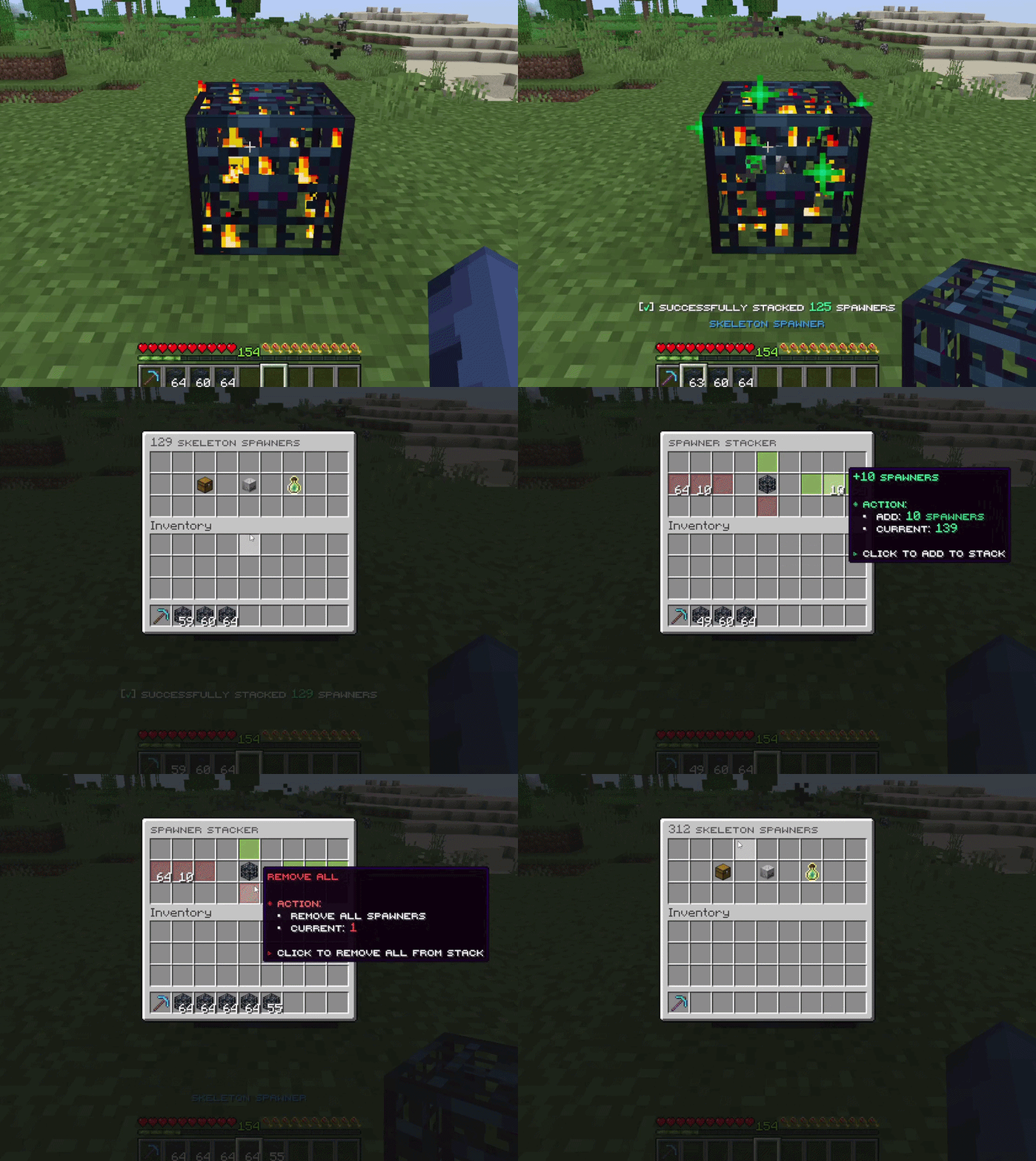
- By Hand: Right-click a spawner with another of the same type to stack it. Sneak to add the whole stack in your hand.
- Stack Menu: Add or remove spawners in exact amounts from the spawner menu.
- Scaling: Drops, experience and storage grow with the stack. 100 spawners give 100 times the drops.
Holograms
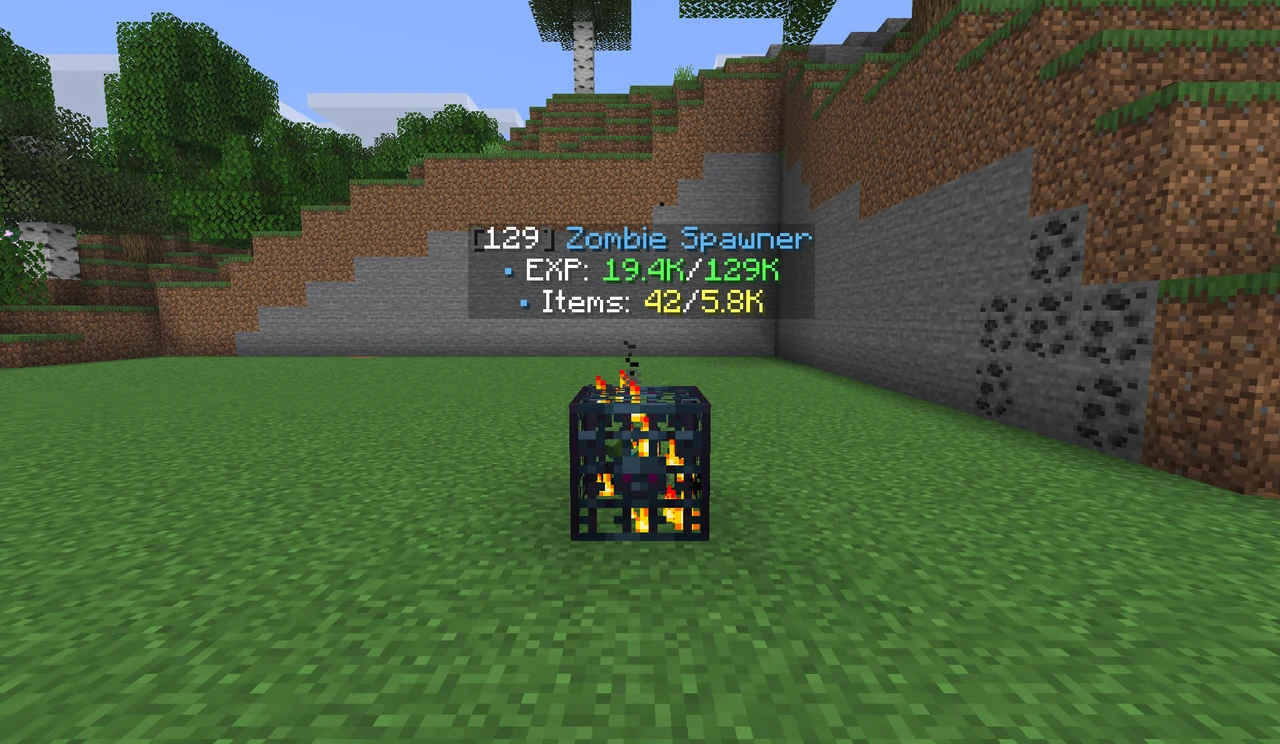
- At a Glance: Floating text above each spawner shows its stack size, stored experience and items.
- Toggle: Turn them on or off with
/ss hologram. Position, alignment and text are configurable.
Spawner Types
- Mob Spawners: Every vanilla mob, each with its own loot and experience in
spawner_mobs.yml. - Item Spawners: Generate materials such as diamonds or iron, set up in
spawner_items.yml. - Custom Spawners: Any number of extra spawners for the same mob or item, each with its own loot and name.
- Vanilla Spawners: Normal Minecraft spawners that spawn real mobs, for mixed setups.
- In-game Loot Editor: Change any spawner's loot with
/ss editloot, no file editing needed.
Admin Tools
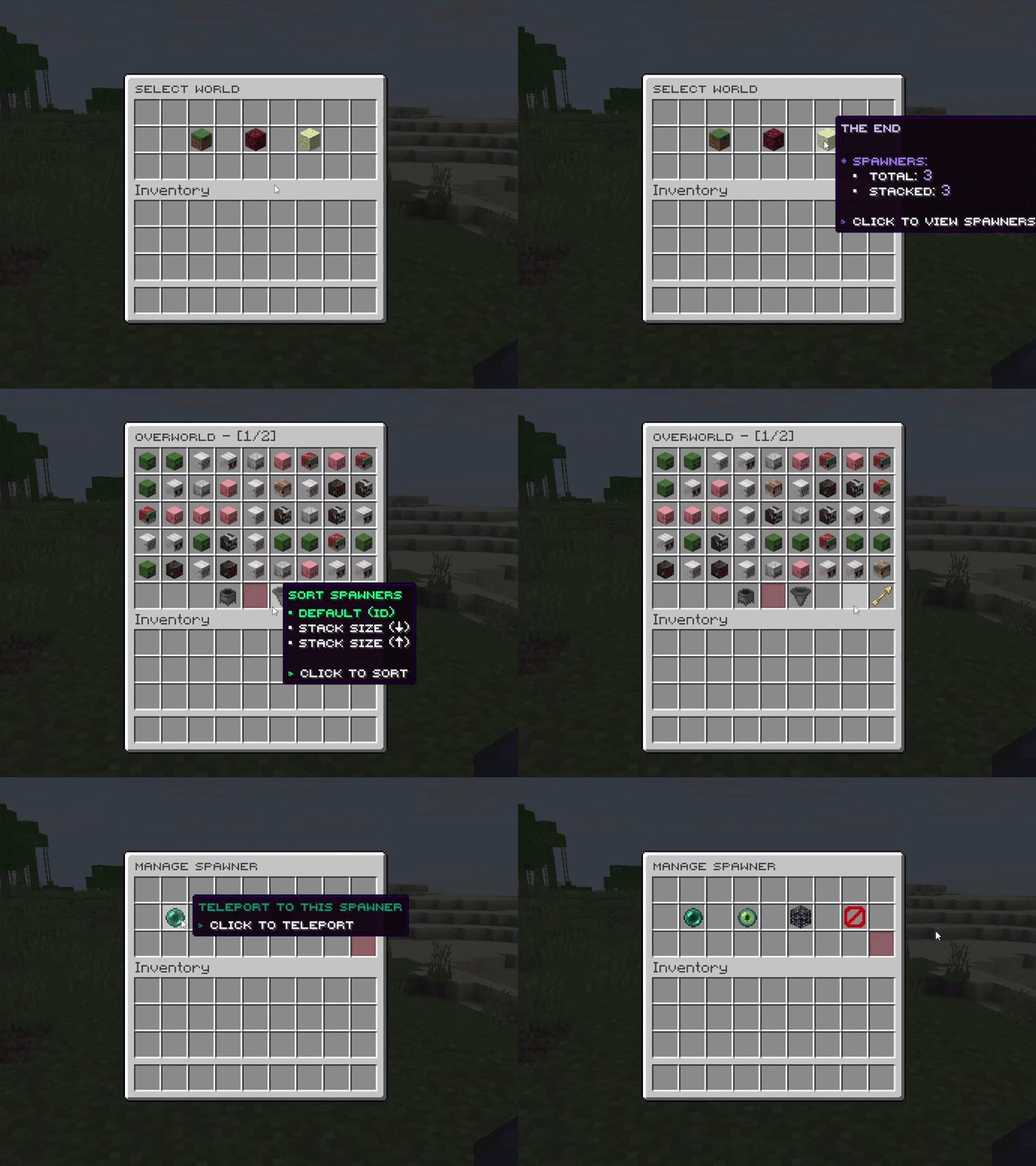
- Spawner List: Browse every spawner by world, filter active and inactive ones, teleport to them, change them or remove them.
- Nearby Scanner:
/ss nearhighlights spawners through walls, visible only to the player who ran it. - Action Logging: Record who placed, broke, stacked or sold, to log files or a Discord webhook.
More Features
- Mineable Spawners: Require Silk Touch or certain pickaxes, set drop chances, and break up to 64 from a stack while sneaking.
- Hoppers: When turned on in
config.yml, hoppers under a spawner pull items out of its storage. - Database: SQLite by default, MySQL or MariaDB for networks that share spawner data.
- Languages: Every message and menu text is editable, with MiniMessage colours, and can follow each player's game language.
Plugin Compatibility
All integrations are optional and turn on only when their plugin is installed.
| Function | Plugins | What SmartSpawner does |
|---|---|---|
| Shop prices |  EconomyShopGUI EconomyShopGUI ShopGUI+ ShopGUI+ zShop zShop |
Prices the items sold from spawner storage |
| Economy |  Vault Vault ExcellentEconomy (Java 25) ExcellentEconomy (Java 25) |
Pays players when they sell |
| Protection and claims |  WorldGuard WorldGuard GriefPrevention GriefPrevention Lands Lands Towny Towny Residence Residence RedProtect RedProtect SimpleClaimSystem SimpleClaimSystem FactionsUUID FactionsUUID BlockLocker BlockLocker |
Checks region and claim permissions before a spawner is opened, stacked or broken |
| Islands and plots |  SuperiorSkyblock2 SuperiorSkyblock2 BentoBox BentoBox IridiumSkyblock IridiumSkyblock PlotSquared PlotSquared minePlots minePlots |
Applies island and plot permissions to spawner actions |
| Skills |  AuraSkills AuraSkills |
Turns claimed spawner experience into skill XP |
| Custom mobs |  MythicMobs MythicMobs |
Drops spawner items from MythicMobs drop tables |
Setup for each plugin is in the integrations guide.
Version Support
| Minecraft version | Java | Server software | Support status |
|---|---|---|---|
| 26.1 – 26.2 | 25 | Paper, Folia, Purpur | Active |
| 1.21.6 – 1.21.11 | 21 | Paper, Folia, Purpur | Active |
One jar runs on every version listed. The ExcellentEconomy integration needs Java 25, as ExcellentEconomy itself does.
Commands and Permissions
/ss, /spawner and /smartspawner all work. Every command also needs smartspawner.command.use.
| Command | Permission | What it does |
|---|---|---|
/ss give <player> <spawner> [amount] |
smartspawner.command.give |
Gives spawners to a player |
/ss list |
smartspawner.command.list |
Opens the admin list of every spawner |
/ss editloot <name> |
smartspawner.command.editloot |
Edits a spawner's loot in game |
/ss reload |
smartspawner.command.reload |
Reloads every config file |
| Permission | Default | What it allows |
|---|---|---|
smartspawner.stack |
Everyone | Stacking spawners |
smartspawner.break |
Everyone | Breaking spawners |
smartspawner.sellall |
Everyone | Selling from spawner storage |
Placing and opening a spawner need no permission at all. If players cannot place spawners, another plugin is blocking it.
Full lists: Commands and Permissions.
For Developers
Java API, click to expand
Create spawner items, read spawner data and listen to spawner events. Add it from JitPack:
repositories { maven { url 'https://jitpack.io' } }
dependencies { compileOnly 'com.github.OpenVdra:SmartSpawner:<version>' }
// Give a stack of 5 zombie spawners.
SmartSpawnerAPI api = SmartSpawnerProvider.getAPI();
player.getInventory().addItem(api.createSpawnerItem(EntityType.ZOMBIE, 5));

// Only VIPs can stack spawners past 1,000.
@EventHandler
public void onStack(SpawnerStackEvent event) {
    if (event.getNewStackSize() > 1000 && !event.getPlayer().hasPermission("myserver.vip")) {
        event.setCancelled(true);
    }
}
See the Developer API guide.
Quick FAQ
Why is there a warning under spawners?
Mojang added this warning in Minecraft 1.21.4. Only OP players see it, and it cannot be removed. See the 1.21.4 release notes.

Does it work on Folia?
Yes. The same jar runs on Paper, Folia and their forks.
Why can't players place spawners?
SmartSpawner never asks for a permission to place a spawner. If placing is blocked, another plugin is stopping it, usually a protection, claim or anti-cheat plugin.
Can players use their own language?
Yes. With language_auto_detect on, messages and menus follow each player's game language when that language is installed.
Supported languages
English, Vietnamese, Simplified Chinese, Turkish, German and Italian.
Want to improve or add a translation? Open a pull request.
Statistics
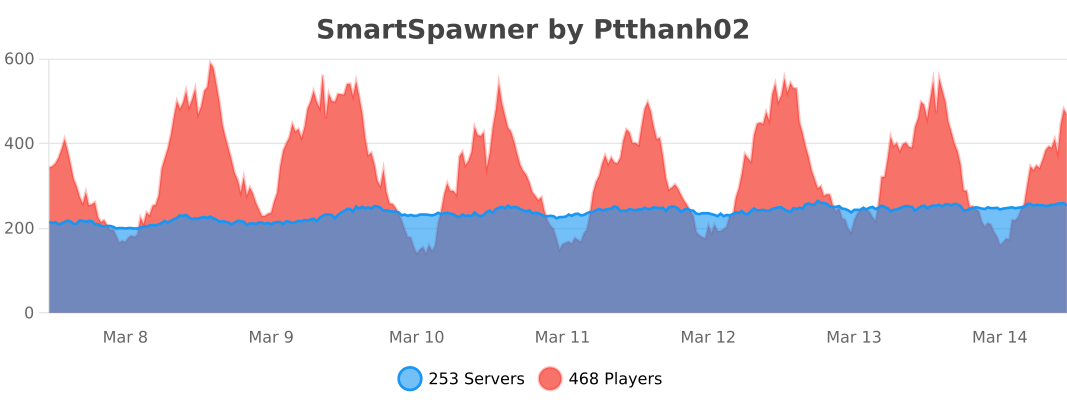
Live server and player counts from bStats.
Information
Pinned Versions
- R1.21.6–26.1.2
Pages
Members
1
Owner