
This plugin is here to add consequences for death without being banned like in hardcore.

death-penalty
This plugin is here to add consequences for death without being banned like in hardcore. If enabled, on death all items will be deleted. There is also a scoreboard keeping track of the number of death.
This plugin also add custom totem with craft that allow the inventory to be dropped or to keep the inventory.
To balance with the original totem, the loot from Evoker was disabled and a craft is added.
The custom totem do not need to be in hand to work, they can be anywhere in your inventory.
A resource pack is given to add the custom totem models.
Resource pack
A resource pack is needed for the custom models of this plugin. If your users don't install it, they will see purple
debug square.
It is recommended to use the same resource pack version as the plugin
Install methods
Per user
You can provide the resource pack to you users and have them install it in their instance.
This is the easiest to set up but user who don't do so or forget to activate it will not see the textures.
Server resource pack
You can serve the resource pack through server settings. You can give the server a link to download the resource pack
and your users will be asked to download the resource pack, you can even enforce it.
However this method need the resource pack to be downloadable somewhere, you can either serve it yourself or you can use
this project GitHub release page to download.
Example using the version at date of writing:
# server.properties
require-resource-pack=true
resource-pack=https\://github.com/Devodius/death-penalty/releases/download/0.3.0/death-penalty-resource-pack-0.3.0.zip
resource-pack-prompt="You need this resource pack for the death-penalty totems"
resource-pack-sha1=e8ba234bd3eceeac663c268a68daadadd507afc7
You will need to calculate the sha1 for each version yourself.
Multiple resource pack
The server can only ask for 1 resource pack. So if you have multiple, you will need to merge them and serve it yourself or use tools made for this purpose.
Custom resource pack
You can use a custom resource pack for the totem. To do so, you will need to have models with these keys:
death_penalty_plugin:totem_of_drop_inventorydeath_penalty_plugin:totem_of_keep_inventory
Totems
Totem of drop inventory
This totem will allow the inventory to drop on death instead of being deleted. It will be deleted on use.
Default craft using coal block, redstone block, gold ingot, diamond, iron ingot and emerald: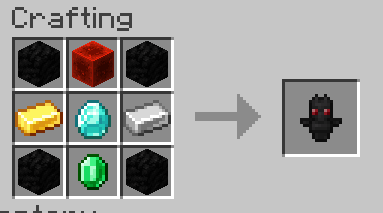
Totem of keep inventory
This totem will allow the player to keep its inventory on death. It will be deleted on use.
Default craft using quartz block, golden apple, dragon breath, wither skeleton head, netherite upgrade smithing template
and netherite ingot: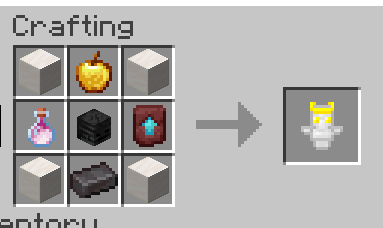
Totem of undying
This is the default minecraft totem.
It's loot is removed from the Evoker and this craft is added:
(resin block, turtle helmet, honey block, totem of drop inventory, beacon, totem of keep inventory, ochre froglight,
pitcher plant, yellow shulker box)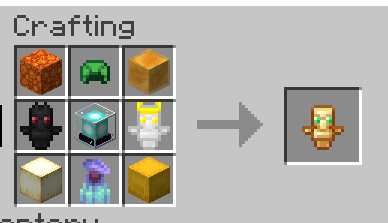
Config
# What happens to inventory on death, possible values:
# DEFAULT : Minecraft default
# TOTEM : CLEAR + totem
# CLEAR : Clear inventory on death
# KEEP : Keep inventory on death
inventoryOnDeath: DEFAULT

# Should the craft for custom totem be enabled.
# Passing this option to false will also allow evoker to drop totems of undying again.
# You can replace the craft using a datapack or a command. cf plugin readme
enableTotemCraft: true

# Should the death scoreboard be enabled
enableDeathCount: true
Commands
Root command: deathpenaltysettings
Alias: dpsettings
Permission: deathpenalty.settings
deathpenaltysettings inventoryOnDeath get: Get the value of the inventoryOnDeath setting.deathpenaltysettings inventoryOnDeath set <value>: Set the value of the inventoryOnDeath setting.
Changing the recipe / model
The plugin is looking for an item with the given custom_data:"minecraft:custom_data": {PublicBukkitValues: {"death_penalty_plugin:custom_totem": "totem_of_drop_inventory"}}
This mean that you can create a custom totem using whatever item, model or recipe you want as long as the custom_data is
set.
If you want to replace the recipe / model, disable the totem craft in the config and add a datapack or plugin to make a
new craft or model.
You can also use a command to give item with the custom data. Exemple:/give @s minecraft:glass_bottle[minecraft:custom_data={PublicBukkitValues:{"death_penalty_plugin:custom_totem":"totem_of_drop_inventory"}}]
This will give a glass bottle that will have the same effect as the totem of drop inventory.
Value to use for custom_totem:
totem_of_drop_inventoryfor the totem of drop inventorytotem_of_keep_inventoryfor the totem of keep inventory
[!WARNING] If the given item isn't a minecraft:totem_of_undying, the animation on death will show a default totem.
FAQ
Why do I see purple debug square ?
Do you see this ?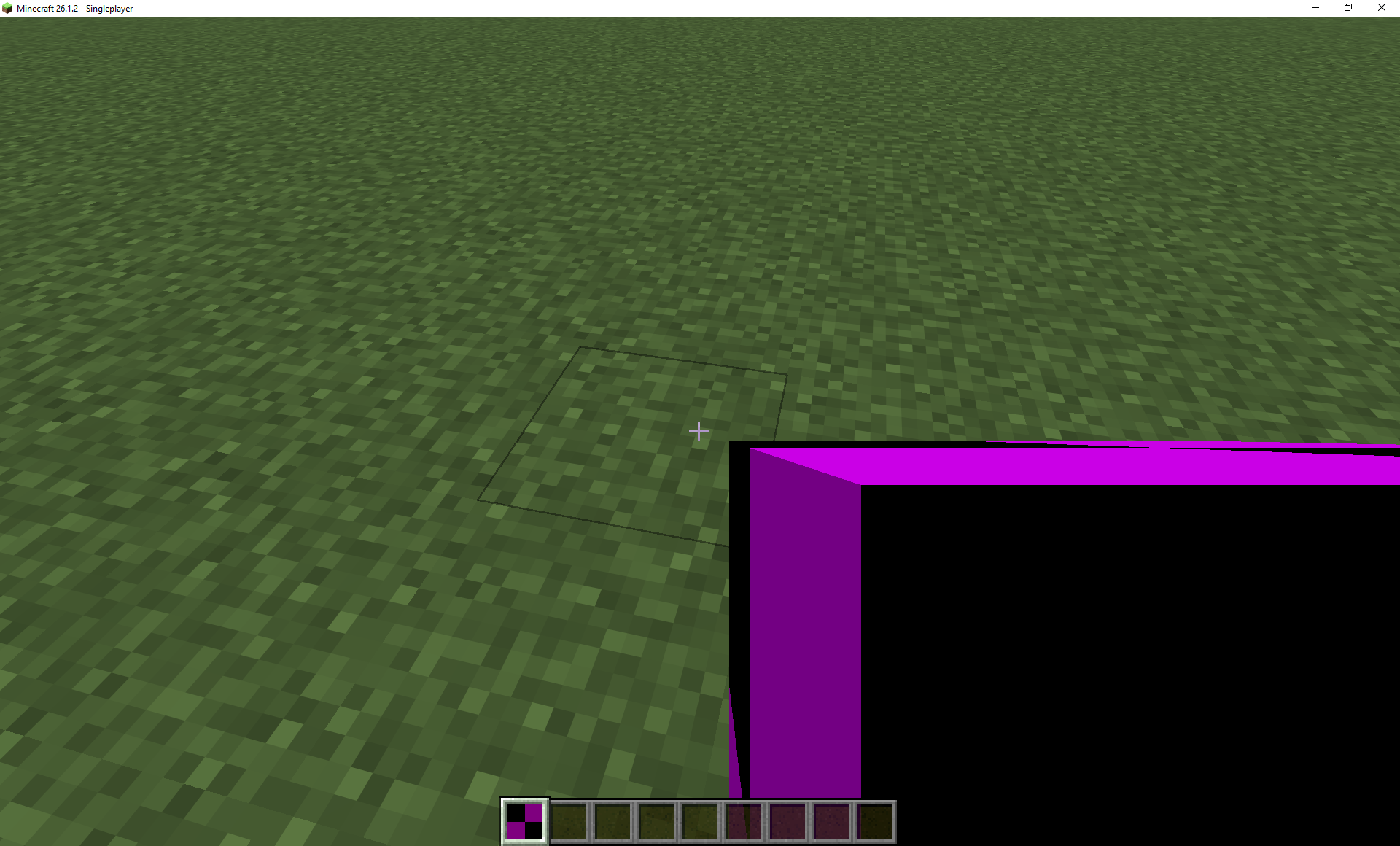
Then the resource pack is not installed
Pages
Members
