
SimpleTrading
A lightweight, no-bullshit trading plugin for Paper servers. Players can request trades, accept them, and swap items through a clean GUI.
[Important]: Support for version 26.3 has been added, but testing is still ongoing. If you encounter any bugs or errors while using 26.3, please submit them using our bug report form.
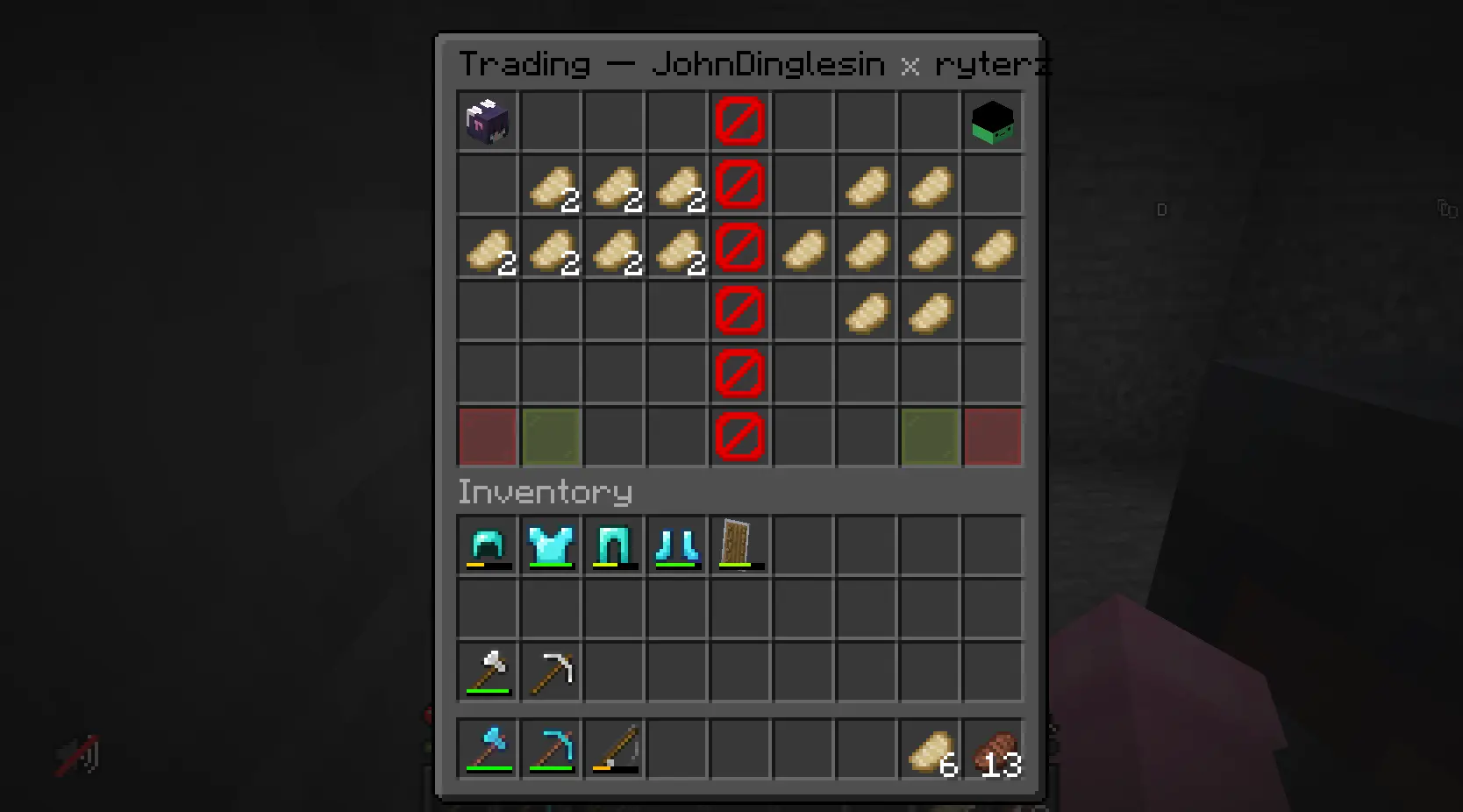
Features
/trade <player>— Send a trade request to a nearby player./tradeaccept— Accept an incoming trade request./tradedecline— Decline an incoming trade request.- Double chest GUI — Both players see the same 54-slot inventory. A barrier block column splits the two sides so nobody can reach into the other person's items.
- Player heads — Each player's head sits in the top corner of their side so you know which side is yours.
- Accept / Decline buttons — Each player has their own accept and decline buttons in the bottom corners of their side. Both must accept for the trade to go through.
- 5-second accept cooldown — When a player adds or removes an item from their trade slots, both players' accept status is reset and a 5-second cooldown is enforced before either can accept again. This prevents players from pulling items out at the last second to scam the other party.
- Items return on cancel — If a trade is cancelled or declined, all items placed in the GUI are returned to their owners.
- Configurable chat colours — Every message the plugin sends is coloured from the config (
messages.success,messages.error,messages.info), so you can recolour the plugin to match your server. - Configurable GUI colour —
gui.colorandgui.decline-colordrive the colours of the buttons and player heads in the trade window. - Configurable GUI title —
gui.titlesets the text at the top of the trade window, with%player1%and%player2%placeholders.
Commands
| Command | Description | Permission |
|---|---|---|
/trade <player> |
Sends a trade request to the specified player. | simpletrading.trade |
/tradeaccept |
Accepts the pending trade request. | simpletrading.tradeaccept |
/tradedecline |
Declines the pending trade request. | simpletrading.tradedecline |
Aliases:
/trade→/t/tradeaccept→/ta/tradedecline→/td
All permissions default to true (everyone can trade).
How It Works
Sending a request
Player A types/trade PlayerB. If Player B is online, within range, and not already in a trade, Player B receives a message telling them to type/tradeacceptor/tradedecline.Accepting
Player B types/tradeaccept. If both players are still within range and neither is in another trade, the trade GUI opens for both players simultaneously.The GUI
Both players see a double chest inventory (54 slots). A vertical line of barrier blocks runs down the middle (column 4). Player A's items go on the left (columns 0–3), Player B's on the right (columns 5–8).- Top corners: Player heads so you know which side is yours.
- Bottom left of your side: Decline button (red glass pane).
- Bottom right of your side: Accept button (green glass pane).
- Barrier column: Unclickable, unmovable.
Trading
Players drag items from their inventory into their own side of the GUI. They cannot touch the other player's items, the barrier, the heads, or the buttons that don't belong to them.Accepting the trade
Each player clicks their accept button. If both players have accepted, the items are swapped: everything Player A put in goes to Player B's inventory, and vice versa. If there's no room in the inventory, items drop on the ground.Declining / Cancelling
If either player clicks decline, closes the inventory, moves out of range, or disconnects, the trade is cancelled, and all items are returned to their owners.
Configuration
After the first run, a config.yml file is generated in plugins/SimpleTrading/config.yml.
# The maximum distance (in blocks) players can be from each other to send/accept trade requests.
# Set to -1 for unlimited range.
trade-range: 10

# Whether to notify players when they receive a trade request
notify-on-request: true

# Whether to cancel the trade if a player moves too far away
cancel-on-move: true

# Colours for the chat messages this plugin sends.
# Any colour code works: &0-&f for colours, plus &l (bold), &o (italic), &n (underlined),
# &m (strikethrough) and &k (magic). Set every value to the same code if you want all of the
# plugin's messages to use one colour.
messages:
  # Messages that confirm something worked (request sent, trade completed, ...)
  success: '&a'
  # Messages that tell you something went wrong (too far away, already trading, ...)
  error: '&c'
  # Neutral status updates (someone accepted, items changed, ...)
  info: '&e'

# The trade GUI itself.
gui:
  # Main colour of the GUI: the accept button and the player heads.
  color: '&a'
  # Colour used for the decline button and the cooldown state (the "you can't do that yet" colour).
  decline-color: '&c'
  # Text shown at the top of the GUI. %player1% and %player2% are replaced with the players' names.
  title: '&0Trading — %player1% &7x &0%player2%'
Support
If you find a bug or have a feature request, or a review, go to the Form
Sponsor

Information
Pinned Versions
- R26.3
Pages
Members
1
Owner