
Craftable invisible light for survival: place and take down vanilla light blocks without commands or creative mode
UnseenLight


UnseenLight is a Minecraft Paper plugin that adds craftable invisible light to survival:
players craft the vanilla light block (minecraft:light) on a workbench, place invisible light
sources in any dark spot and take them back down with a right click. Hidden lighting for builds,
farms and mob-proofing with no commands, no creative mode and no resource packs.
Crafting
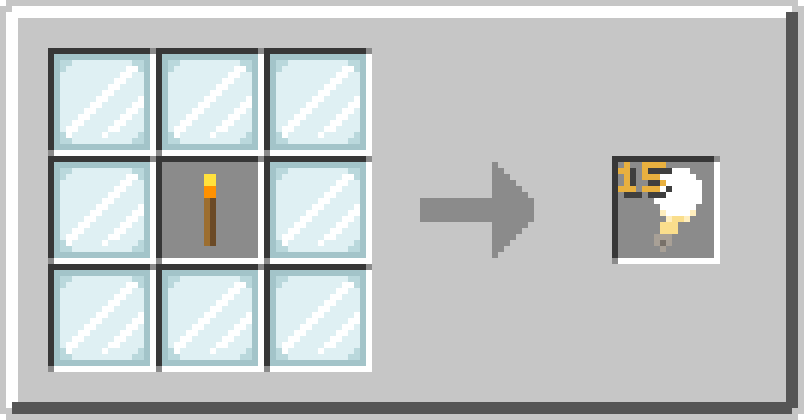
8 glass panes + 1 torch -> 1 invisible light (level 15).
The shape, ingredients, yield and light level are all configurable. The recipe shows up in the recipe book on join (also configurable).
Using it
| Action | How |
|---|---|
| Place | Hold the light item and right-click any dark spot - plain vanilla placement |
| Remove | Hold any block and right-click the spot the light occupies; the light pops back as an item instead of your block being placed |
| Remove behind chests/doors | Sneak + right-click (a plain click opens the container, like vanilla) |
| See placed lights | Hold a light item - vanilla renders them - or run /ul show for a particle highlight |
A light block is invisible and has no hitbox, so your crosshair passes through it; aim so that the block you are "placing" would land in the light's spot.
What the plugin guards against
minecraft:light is replaceable, so in vanilla almost anything overwrites it silently. UnseenLight
intercepts every such path - the light either pops properly (permission checked, land protection
consulted, item returned) or stays protected:
- block placement into the light's spot, from either hand, in any game mode;
- lava and powder snow buckets (water just waterlogs the light and is left alone);
- falling blocks landing in the spot (the item is compensated);
- the vanilla break while holding a light item (lights have no loot table - drop-mode is honoured);
- Crafter blocks crafting the recipe with nobody's permission to check (optional,
recipe.allow-crafter); /minecraft:reloadwiping plugin recipes (the recipe re-registers itself).
Land protection plugins (WorldGuard, GriefPrevention, …) are consulted through a BlockBreakEvent
before any light is removed, and CoreProtect-style loggers see the removal.
Commands
Alias: /ul
| Command | Description | Permission (default) |
|---|---|---|
/unseenlight reload |
Reload config.yml |
unseenlight.command.reload (op) |
/unseenlight give <players> [level] [amount] |
Give light items | unseenlight.command.give (op) |
/unseenlight show |
Highlight nearby lights with particles | unseenlight.command.show (everyone) |
Permissions
| Node | Default | Grants |
|---|---|---|
unseenlight.craft |
true | Crafting the recipe (and seeing it in the recipe book) |
unseenlight.place |
true | Placing light blocks |
unseenlight.remove |
true | Taking placed lights down |
Configuration
Everything lives in config.yml: the recipe (shape, ingredients, yield, light level 0-15),
sounds and particles for placing/removing, the highlighter (radius, duration), and every player
message in MiniMessage format.
The most consequential switch is what a removed light turns into:
removal:
  drop-mode: GROUND     # GROUND: drops as an item
                        # INVENTORY: goes straight to the inventory
                        # DESTROY: disappears without a trace
Installation
- Requires Paper 26.2 or 26.3 and Java 25+.
- Drop
UnseenLight-x.y.jarintoplugins/and restart.
Building
./gradlew build        # -> build/libs/UnseenLight-<version>.jar (shaded, ready to deploy)
./gradlew runServer    # spins up a local Paper 26.3 test server with the plugin
Metrics
Anonymous usage stats are collected via bStats.
Server owners can opt out globally in plugins/bStats/config.yml.
License
Pinned Versions
- R26.2–26.3
Pages
Members
1
Owner