» What is ZStaffChatPro?
ZStaffChatPro is a powerful and lightweight staff chat plugin designed for Minecraft server networks. It allows your staff team to communicate privately across multiple servers using customizable chat channels. Whether you run a small survival server or a large network with dozens of servers, ZStaffChatPro provides the tools your staff needs to coordinate effectively.
The plugin supports all major server platforms including Spigot, Paper, Folia, BungeeCord, Waterfall, and Velocity. It works on Minecraft versions from 1.8 all the way to the latest 1.21+ releases.
» Why Choose ZStaffChatPro?
- Multi-Platform Support - Single plugin works on Spigot, Paper, Folia, BungeeCord, Waterfall, and Velocity
- Unlimited Custom Channels - Create as many staff channels as you need (Admin, Mod, Builder, Helper, etc.)
- Discord Integration - Two modes: Full Bot (bidirectional) or simple Webhook (one-way)
- Modern Minecraft Support - Full support for 1.8 - 1.21+ including Folia servers
- LuckPerms Integration - Automatic prefix/suffix/rank display from LuckPerms
- HEX Colors & Gradients - Modern color formatting for 1.16+ servers
- Lightweight & Fast - Optimized code with minimal server impact
- Easy Configuration - Simple YAML configuration with extensive documentation
- Auto-Update Config - New config options are automatically added on plugin update
- Global Mode - Optional single channel mode for simpler setups
- Server Aliases - Custom server display names for proxy networks
- Staff Playtime Tracking - Track staff online time with /stafftime command
- AFK Detection - Automatic AFK detection with configurable timeout
- PremiumVanish Integration - Hide vanished staff from /stafflist for non-staff players
- bStats Integration - Anonymous plugin statistics
» Detailed Features
Unlimited Custom Channels
Create unlimited staff chat channels, each fully customizable with its own settings:
| Option | Description | Example |
|---|---|---|
display-name |
Name shown in messages | "Staff", "Admin", "Builder" |
prefix |
Prefix before channel messages | "&c[Staff] ", "&4[Admin] " |
permission |
Permission required to use the channel | "zstaffchat.staff" |
format |
Complete message format with placeholders | "&c[Staff] {player}: {message}" |
command |
Main command to send messages | "staffchat", "adminchat" |
aliases |
Alternative shorter commands | ["sc", "s"], ["ac", "a"] |
chat-prefix |
Quick prefix symbol for fast messaging | "!", "#", "?" |
enabled |
Enable or disable the channel | true / false |
Example Channel Configuration:
channels:
  staff:
    display-name: "Staff"
    prefix: "&c[Staff] "
    permission: "zstaffchat.staff"
    format: "&c[Staff] &7{player}: &f{message}"
    command: "staffchat"
    aliases:
      - "sc"
    chat-prefix: "!"
    enabled: true

  admin:
    display-name: "Admin"
    prefix: "&4[Admin] "
    permission: "zstaffchat.admin"
    format: "&4[Admin] {lp_prefix}&7{player}: &f{message}"
    command: "adminchat"
    aliases:
      - "ac"
    chat-prefix: "#"
    enabled: true
Format Placeholders
Basic Placeholders:
| Placeholder | Description | Example Output |
|---|---|---|
{player} |
Player's name | Steve |
{message} |
The message content | Hello team! |
{channel} |
Channel display name | Staff |
{prefix} |
Channel prefix | [Staff] |
{server} |
Server name (proxy only) | Survival |
LuckPerms Placeholders (requires LuckPerms):
| Placeholder | Description | Example Output |
|---|---|---|
{lp_prefix} |
Player's LuckPerms prefix | &c[Owner] |
{lp_suffix} |
Player's LuckPerms suffix | &7[VIP] |
{lp_group} |
Player's primary group name | admin |
{lp_rank} |
Player's group display name | Administrator |
HEX Color Support (1.16+)
| Type | Format | Example |
|---|---|---|
| Single HEX Color | {#RRGGBB} |
{#FF5555}Red text |
| Gradient | {#HEX1>>#HEX2}text{/} |
{#FF0000>>#0000FF}Rainbow{/} |
| Legacy Colors | &0-&9, &a-&f |
&cRed &aGreen &bAqua |
| Formatting | &l, &o, &n, &m, &k |
&lBold &oItalic |
Formatting with HEX colors:
# Bold red text
format: "&l{#FF0000}Bold Red Text"

# Bold gradient
format: "{#FF0000>>#0000FF}&lBold Gradient{/}"
Staff Playtime Tracking
Track how long your staff members are online:
- Today's playtime - Track daily activity
- Weekly playtime - Track weekly activity
- Total playtime - All-time statistics
- AFK time tracking - Separate AFK time from active time
- Permission-based - Only track players with specific permission
Commands:
/stafftime- View your own playtime/stafftime <player>- View another player's playtime
AFK Detection
Automatic detection of inactive staff members:
- Configurable timeout - Set AFK threshold (default: 5 minutes)
- [AFK] prefix in /stafflist - Easy identification of inactive staff
- AFK time tracking - Track how long staff is AFK in playtime stats
- Chat activity detection - Any chat activity resets AFK timer
AFK Configuration:
afk:
  enabled: true
  timeout-minutes: 5
» Discord Integration
Bot Mode (Bidirectional)
Full Discord bot integration with two-way communication:
- Bidirectional messaging - Messages sync both ways (Minecraft ↔ Discord)
- Staff can respond from Discord - Your team can chat from mobile or desktop
- Separate Discord channel per staff channel - Map each Minecraft channel to its own Discord text channel
- Role-based permissions - Restrict who can send messages from Discord
- Runtime library loading - JDA library downloads automatically (keeps JAR small)
Bot Mode Setup:
discord:
  mode: "bot"
  bot-token: "YOUR_BOT_TOKEN_HERE"

  channels:
    staff: "1234567890123456789"
    admin: "9876543210987654321"

  format:
    to-discord: "**[{channel}]** {player}: {message}"
    to-minecraft: "&7[&9Discord&7] &7{player}: &f{message}"

  required-roles:
    - "Staff"
    - "Admin"
Webhook Mode (Simple)
Lightweight one-way integration for basic Discord logging:
- One-way sync - Messages go from Minecraft to Discord only
- No bot setup required - Just create a webhook in Discord
- Per-channel webhooks - Each channel can have its own Discord webhook
- Lightweight - No external libraries needed
Webhook Mode Setup:
discord:
  mode: "webhook"

  webhook:
    channels:
      staff: "https://discord.com/api/webhooks/..."
      admin: "https://discord.com/api/webhooks/..."
    username: "StaffChat"
    format: "**[{channel}]** {player}: {message}"
» Commands & Permissions
Command Reference
| Command | Description | Permission |
|---|---|---|
/zstaffchat reload |
Reload all configuration files | zstaffchat.reload |
/zstaffchat about |
Show plugin info | zstaffchat.use |
/staffspy |
Toggle spy mode to see all channels | zstaffchat.spy |
/stafflist |
Show online staff members by channel | zstaffchat.stafflist |
/stafftime |
View your playtime statistics | zstaffchat.stafftime |
/stafftime <player> |
View another player's playtime | zstaffchat.stafftime.others |
/<channel> <message> |
Send message to specific channel | Channel permission |
/<channel> |
Toggle chat mode for channel | Channel permission |
Default Channel Commands:
/staffchator/sc- Staff channel/adminchator/ac- Admin channel/builderchator/bchat- Builder channel
Permission Reference
| Permission | Description | Default |
|---|---|---|
zstaffchat.use |
Access to main /zstaffchat command | OP |
zstaffchat.reload |
Reload plugin configuration | OP |
zstaffchat.spy |
Use spy mode to see all channels | OP |
zstaffchat.stafflist |
View online staff list | OP |
zstaffchat.stafftime |
View own playtime statistics | OP |
zstaffchat.stafftime.others |
View other players' playtime | OP |
zstaffchat.see-vanished |
See vanished players in /stafflist | OP |
zstaffchat.staff |
Access default staff channel | OP |
zstaffchat.admin |
Access default admin channel | OP |
zstaffchat.builder |
Access default builder channel | OP |
» Supported Platforms
| Platform | Minecraft Versions | JAR File | Java |
|---|---|---|---|
| Spigot / Paper | 1.8 - 1.21+ | ZStaffChatPro.jar | Java 8+ |
| Folia | 1.19+ | ZStaffChatPro-Folia.jar | Java 17+ |
| BungeeCord / Waterfall | All versions | ZStaffChatPro.jar | Java 8+ |
| Velocity | 3.0+ | ZStaffChatPro.jar | Java 17+ |
Important Notes:
- The main JAR (
ZStaffChatPro.jar) works on Spigot, Paper, BungeeCord, Waterfall, and Velocity - Folia requires a separate JAR (
ZStaffChatPro-Folia.jar) due to different API requirements - For proxy setups (BungeeCord/Velocity), install the plugin on the proxy server only
- HEX colors and gradients require Minecraft 1.16+ clients
» Installation Guide
Single Server (Spigot/Paper)
- Download ZStaffChatPro.jar
- Place it in your server's
pluginsfolder - Restart your server
- Edit configuration files in
plugins/ZStaffChatPro/ - Use
/zstaffchat reloadto apply changes
Folia Server
- Download ZStaffChatPro-Folia.jar
- Place it in your server's
pluginsfolder - Restart your server
- Configure as normal
Proxy Network (BungeeCord/Velocity)
- Download ZStaffChatPro.jar
- Place it in your proxy's
pluginsfolder (NOT on backend servers) - Restart your proxy
- Messages will sync across all connected servers automatically
» Feature Comparison
| Feature | ZStaffChatPro | Other Plugins |
|---|---|---|
| Unlimited Channels | Yes | Usually 1-3 |
| Multi-Platform | 6 Platforms | Usually 1-2 |
| Discord Integration | Bot + Webhook | Rare/Paid |
| LuckPerms Support | Full (4 placeholders) | Limited |
| HEX Colors | Yes + Gradients | Sometimes |
| Folia Support | Native | Very Rare |
| Quick Prefixes | Per Channel | Global Only |
| Toggle Mode | Yes | Sometimes |
| Spy Mode | Yes | Sometimes |
| Auto-Update Config | Yes | No |
| Staff Playtime | Yes + AFK tracking | Rare |
| AFK Detection | Yes | No |
| PremiumVanish | Yes | Rare |
» Plugin Statistics
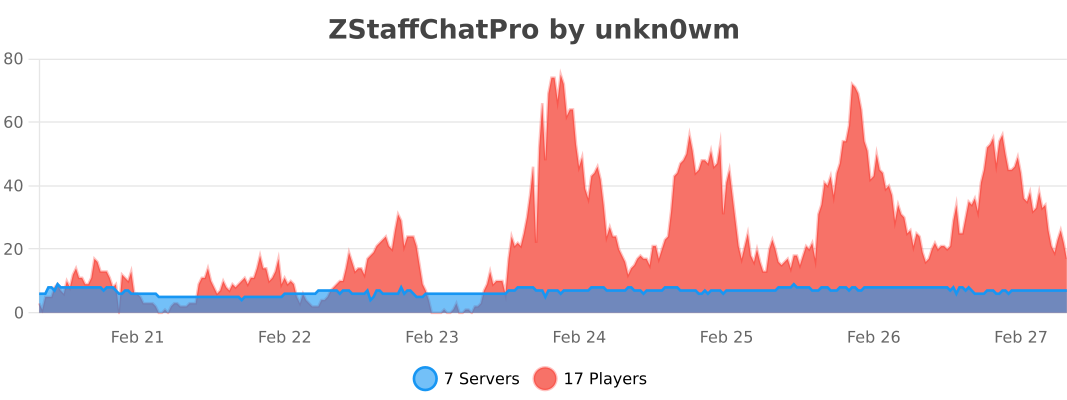
Information
| Category | Chat |
|---|---|
| Published on | January 3, 2026 |
| License | Unspecified |
| Downloads | 11 |
| Stars | 0 |
| Watchers | 0 |
Pinned Versions
Pages
Members