
Removes the cap on the number of enchantments and the too expensive block on enchantments.
EnchantCap
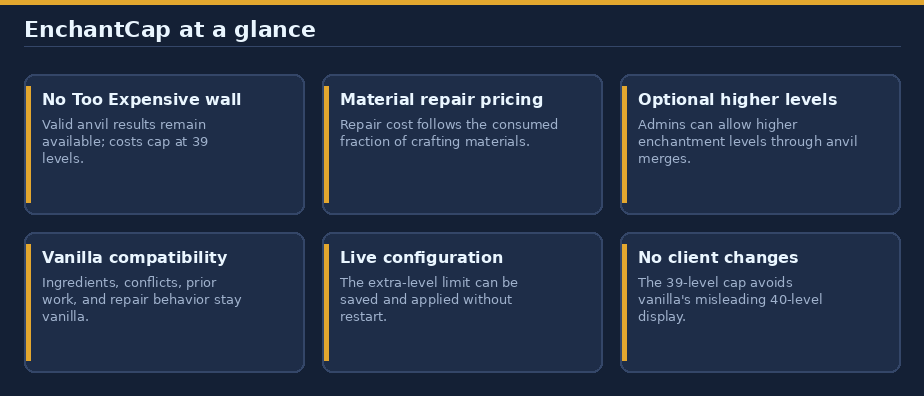
Keep valid anvil work possible without changing vanilla compatibility or charging rules. EnchantCap removes the anvil's 40-level cutoff, caps valid operations at 39 levels, and can optionally allow extra enchantment levels from anvil merges.
Built for Paper 26.3 / Java 25. No runtime dependencies.
In game: use
/help enchantcapfor the player guide. Operators and users withenchantcap.adminalso see the setting and command. The guide provides clickable links to this page and the issue tracker.
Contents
- Quick start
- Anvil costs
- Material repair prices
- Extra enchantment levels
- Commands
- Permissions
- Configuration
- Compatibility and limits
- Install
- Links and support
Quick start
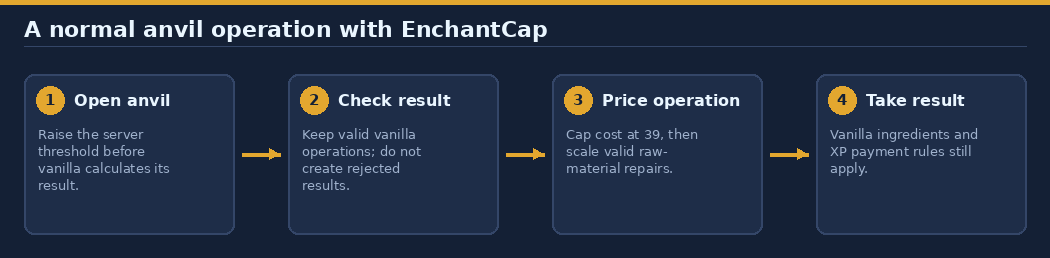
- Install the plugin and open an anvil as usual.
- Repair, rename, or combine compatible items or books. Valid results whose vanilla cost is 40 or more can now appear.
- Pay the resulting level cost (at most 39) and provide the normal materials. Players still need enough XP levels.
This applies to all players and normal anvil operations, including repairs, renaming, tools, armor, weapons, and enchanted books. It does not change the enchanting table.
Anvil costs
Paper's server-side maximum repair cost is raised before anvil results are calculated, so an expensive valid result is not discarded first. A valid operation's displayed and charged cost is capped at 39 XP levels. This avoids the vanilla client's hard-coded "Too Expensive" display at 40 or more. Positive costs remain positive.
Vanilla item compatibility, enchantment conflicts, ingredient consumption, repair amounts, and prior-work penalties are preserved. EnchantCap does not create a result when vanilla or another plugin rejects the operation, and it does not modify the input items.
Combining tools, enchanting without material repair, and renaming without material repair keep their ordinary vanilla prices, capped at 39. If a material repair also renames the item, the material fraction scales the entire operation's capped cost.
Material repair prices
For a valid repair using raw materials, EnchantCap scales the capped cost by the amount of repair material actually consumed:
charge = ceil(min(normal anvil cost, 39) × min(materials consumed, crafting count) / crafting count)
| Item category | Crafting count | One material at a capped cost of 39 |
|---|---|---|
| Pickaxe or axe | 3 | 13 levels |
| Sword or hoe | 2 | 20 levels |
| Shovel | 1 | 39 levels |
| Helmet | 5 | 8 levels |
| Chestplate | 8 | 5 levels |
| Leggings | 7 | 6 levels |
| Boots | 4 | 10 levels |
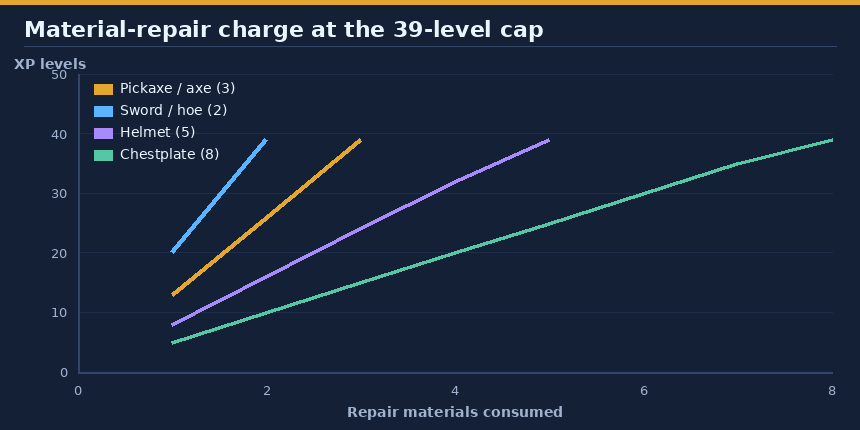
This covers wooden, stone, copper, iron, gold, diamond, and netherite tools, plus material-repairable armor. The crafting count comes from the item category, including upgraded netherite gear. The ingredient must be valid for that item; stone and wooden tools retain vanilla's accepted repair-material choices. Only ingredients actually consumed count, not the stack size in the anvil. Fractions round up, and positive charges never become free. Categories outside these tool/armor cases (for example, elytra and maces) keep their usual capped prices.
Extra enchantment levels
By default (max-additional-enchantment-levels: 0), vanilla maximum levels remain in force. An administrator can opt into higher levels produced by normal anvil merging:
| Setting | Resulting limit | Example |
|---|---|---|
0 |
Vanilla maximum | Unbreaking III, Efficiency V |
1 |
Vanilla maximum + 1 | Unbreaking IV, Efficiency VI |
2 |
Vanilla maximum + 2 | Up to two above the vanilla maximum |
With the setting at 1, equal-level Unbreaking III items or books can merge to IV. Unequal levels follow vanilla merging. Merely repairing or renaming does not grant levels. Compatibility/conflict checks remain vanilla, and only valid anvil results are adjusted. Enchanting tables, loot, and villager trades are unchanged. Some enchantments gain little or no gameplay benefit from extra levels.
The setting accepts integer values from 0 through 254, while resulting enchantment levels cannot exceed Minecraft's 255 limit. Lowering the setting does not remove higher enchantments already on the left-hand item, but prevents increasing them beyond the configured limit; an over-level right-hand item or book cannot transfer a level above that limit.
Commands
| Command | Who | What it does |
|---|---|---|
/enchantcap max-additional-enchantment-levels |
Admins | Show the active setting. |
/enchantcap max-additional-enchantment-levels <0-254> |
Admins | Save and apply the setting immediately; no restart required. |
/help enchantcap |
Everyone | Open the in-game guide and links. |
The admin command is available to operators, the server console, and players granted enchantcap.admin. Invalid values and unauthorized users cannot change the setting. If saving fails, the active value stays unchanged and an error is sent to the command sender and server log. A changed value closes currently open anvils and tells players to reopen them; setting the same value does not close menus. Existing items are not altered.
Tab completion suggests the setting name and values 0, 1, and 2.
Permissions
| Permission | Default | Grants |
|---|---|---|
enchantcap.admin |
Operators | View/change the extra-level setting and see admin-only help details. |
| Anvil use | Everyone | EnchantCap changes; no permission is required. |
Configuration
On first start, plugins/enchantcap/config.yml is created:
max-additional-enchantment-levels: 0
| Setting | Default | Allowed values | Meaning |
|---|---|---|---|
max-additional-enchantment-levels |
0 |
Integer 0-254 |
Extra levels beyond each enchantment's vanilla maximum for anvil combinations. |
After editing the file manually, restart the server. Invalid or missing values outside the supported range prevent startup rather than silently falling back. Use the admin command for an immediate, saved change.
Compatibility and limits
- The maximum server threshold is
Integer.MAX_VALUE; operations reaching that representational limit are not supported. Prior-work costs still grow, so this is not an infinite-integer repair system. - Another anvil plugin can conflict if it replaces results, thresholds, or costs after EnchantCap runs.
- Restart the server after installing or removing plugins. Do not use plugin hot-reload.
- Vanilla clients hard-code the "Too Expensive" message at 40 levels. The 39-level cap is intentional; uncapped charging would require accepting a misleading client display or requiring a client modification.
Install
- Download the latest jar from Hangar.
- Put
enchantcap-0.3.0.jarin the server'splugins/folder and restart Paper 26.3 on Java 25. - Optional: set additional enchantment levels with
/enchantcap max-additional-enchantment-levels 1.
To build locally, run ./gradlew build --console=plain in the plugin folder. Gradle runs on Java 17+ and provisions a Java 25 toolchain if needed; the server itself must run Java 25. Tests use Mockito/MockBukkit and do not simulate the full native anvil menu. Test real anvil behavior on Paper before using it with valuable items. A normal build does not deploy or publish.
Build from source and publish
The Hangar publication targets rewrite123/enchantcap, channel Release, and Paper 26.3. Create the Hangar project and provide HANGAR_API_TOKEN with create_version permission. Never store credentials in build files.
./gradlew build publishPluginPublicationToHangar syncAllPluginPublicationPagesToHangar --console=plain
For later releases, choose a unique version in gradle.properties and supply release notes with -PhangarChangelog="...". This README is synced as the Hangar resource page. Regenerate original diagrams from the repository root with python3 tools/docs/enchantcap.py. Images use absolute raw GitHub URLs to render on Hangar and GitHub.
Links and support
- Source and full guide: github.com/rewrite123/papermc-plugins/tree/main/enchantcap
- Download: hangar.papermc.io/rewrite123/enchantcap
- Report a bug or request a feature: GitHub issues
Information
Pinned Versions
- R26.3
Pages
Members
1
Owner