
Flip fixed music-disc pairs in the crafting grid. Unique discs are unflippable.
FlipDisc
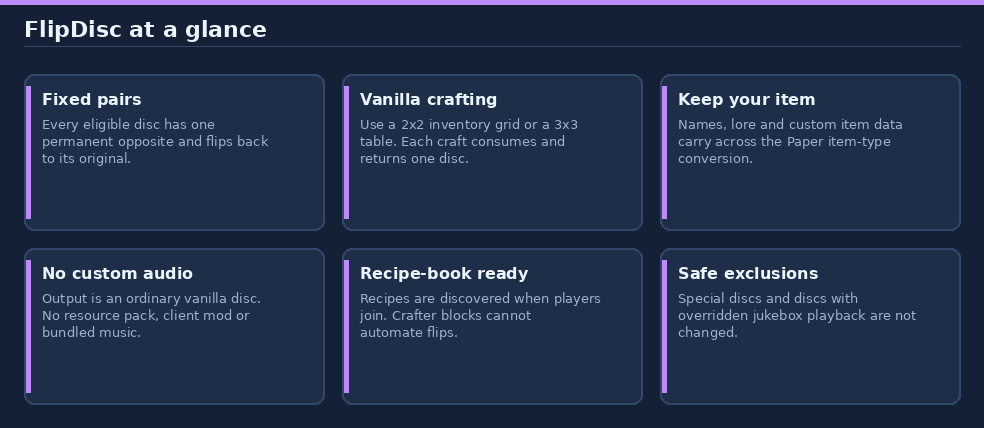
Give eligible music discs a B-side: flip once to swap songs, flip again to return.
For Paper 26.3 and Java 25. No resource pack, client mod, extra plugin, or bundled audio is needed.
In game: use
/help flipdiscfor the full guide. The guide ends with clickable links to this page and the issue tracker.
Contents
- Quick start
- Permanent song pairs
- Limitations and item data
- Commands, permissions, and configuration
- Install
- Build from source and publish
- Links and support
Quick start
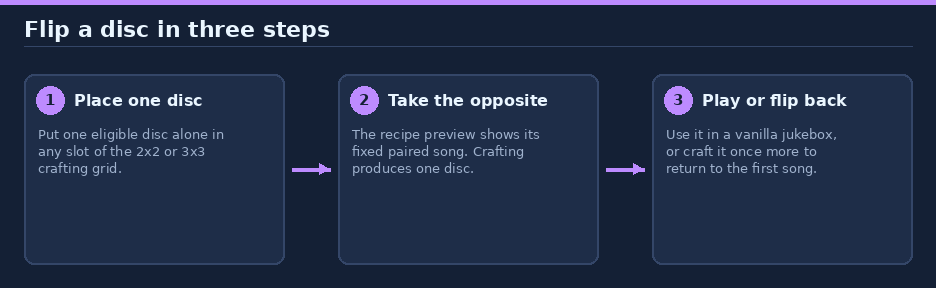
- Open your inventory's 2 x 2 crafting grid or a crafting table's 3 x 3 grid.
- Put exactly one eligible disc, alone, in any slot.
- Take the paired disc from the result. Use it in a vanilla jukebox, or craft it again to flip back.
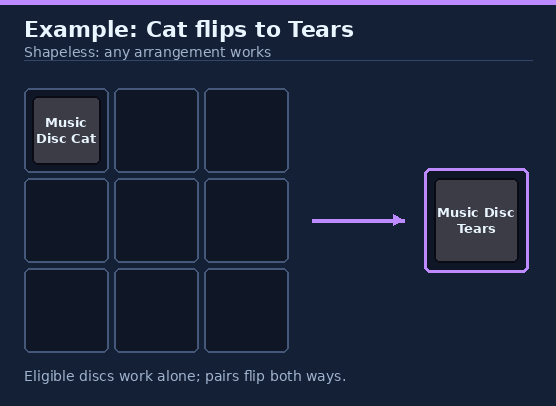
The example shows Cat becoming Tears. Every listed pair has the same shapeless, one-disc-only recipe. Each craft consumes one disc and returns one disc. Recipes are discovered for players when they join; regular crafting behavior handles shift-clicking and inventory space.
Permanent song pairs
| Disc | Artist | Flips to | Artist |
|---|---|---|---|
| Cat | C418 | Tears | Amos Roddy |
| Blocks | C418 | 11 | C418 |
| Chirp | C418 | Bounce | Fingerspit |
| 13 | C418 | Mellohi | C418 |
| Far | C418 | Strad | C418 |
| Mall | C418 | Stal | C418 |
| Wait | C418 | Ward | C418 |
The pair mapping is fixed and reversible. A disc can only become its listed opposite, not any other song. Different artists are paired wherever possible; most eligible tracks are by C418.
Artist references: Tears and Bounce. FlipDisc only selects existing vanilla songs; it does not distribute music.
Limitations and item data
| Disc or condition | Behavior |
|---|---|
| Pigstep, Otherside, 5, Relic, Creator, Creator (Music Box), Precipice, Lava Chicken | No flip recipe; these stay single-sided. |
| A disc with an overridden jukebox-playback component | Not flipped, so a custom-song item is left alone. |
| A Minecraft disc introduced in a future version | Not automatically paired; pair assignments are explicit. |
| A crafter block | Cannot perform the manual flip recipes. |
| Names, lore, and other custom item data | Preserved when the disc changes type. |
FlipDisc uses Paper's item-type conversion and outputs an ordinary vanilla disc for the selected song. There is no special playback logic: removing the plugin leaves existing discs playable as their current song. Vanilla crafting controls consumption and output distribution.
The unit tests cover pair symmetry and exclusions, crafting in both grid sizes, metadata-preserving conversion, custom-song rejection, result validation, and automated-crafter prevention. These are mocked Paper tests, not an in-game test of Paper's crafting engine.
The Blocks/11 pairing replaced the earlier Blocks/Lava Chicken pairing in version 0.1.1. Existing Lava Chicken discs were not converted and remain unflippable; Blocks discs now flip to 11. No inventory migration is performed during upgrades.
Commands, permissions, and configuration
| Surface | Available |
|---|---|
| Plugin commands | None. Use the crafting grid; /help flipdisc is Paper's help topic. |
| Plugin permissions | None. |
| Configuration files | None. |
| Runtime dependencies | None beyond Paper. |
Install
Requires Paper 26.3 and Java 25.
- Download the JAR from Hangar.
- Place it in the server's
pluginsdirectory. - Restart Paper.
To uninstall or update, stop the server, replace or remove the JAR, then restart. Avoid hot-reloading.
Build from source and publish
From the flipdisc folder, build and run the unit tests:
./gradlew build --console=plain
The Gradle wrapper uses Gradle 9.1.0 and the project compiles with the Java 25 toolchain. Build output is in build/libs/. From the repository root, regenerate the original documentation diagrams with:
python3 tools/docs/flipdisc.py
The Hangar publication targets rewrite123/flipdisc, the Release channel, and Paper 26.3. Create the Hangar project and provide a token with create_version permission through HANGAR_API_TOKEN; never commit the token. Normal builds do not publish. To publish a version and sync the README page:
./gradlew build publishPluginPublicationToHangar syncAllPluginPublicationPagesToHangar --console=plain -PhangarChangelog="Release notes"
Choose a new version in gradle.properties before publishing. The Hangar project page is synced from this README.
To regenerate the original project icon from the repository root, run python3 tools/generate-project-icons.py --project flipdisc; this only updates the local icon and does not upload it.
Links and support
Information
Pinned Versions
- R26.3
Pages
Members
1
Owner