
Minecart speed boosts and fast travel along ride-registered lodestone rail lines; each player can opt out of either.
minecarttravel
Turn ordinary rail journeys into timed speed boosts and lodestone-to-lodestone fast travel. Register a route by riding it; no world scan, custom items, or fees.
Built for Paper 26.3 / Java 25. No runtime dependencies.
Latest version: 0.3.0.
What's new in 0.3.0: an in-game /help minecarttravel guide now explains player commands, registration, safety, and owner settings. It links to the source and issue tracker; admins see the config details.
Previous releases:
- 0.2.3: default boost delay is 15 seconds and fast travel starts after 30 seconds total. Existing saved settings are preserved; use
/minecarttravel set boost-delay 15and/minecarttravel set fast-travel-delay 30to apply the defaults to an existing server. - 0.2.2: destination chunks receive tickets individually as they load, protecting them from an unload race. Failed preparation or teleport resumes the saved cart velocity only if the track is safe; fast travel does not retry until a new ride.
- 0.2.1: players can opt out of boost and fast travel separately.
- 0.2.0: route registration changed from background rail scanning to riding a line. Lines recorded by 0.1.x must be registered again;
rail-graph.txtis ignored. Admins also gained live settings.
Speed boosts and arrivals work in two-block-tall tunnels: only the block directly above the rail must be passable (air, torches, and redstone torches are fine).
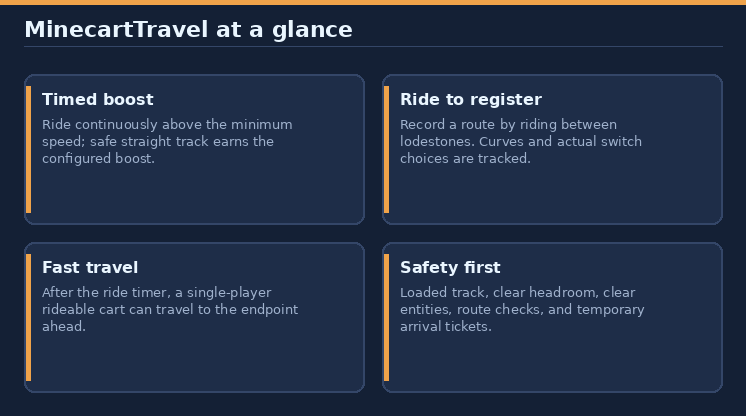
In game: use
/help minecarttravelfor the full guide. It lists every command; admins also see configuration and route-checking details. Players receive clickable links to the project page and issue tracker.
Contents
- Quick start
- Riding and speed boosts
- Register a fast-travel line
- Fast travel
- Commands
- Permissions
- Configuration and admin settings
- Route storage and performance
- Install
- Build from source and publish
- Links and support
Quick start
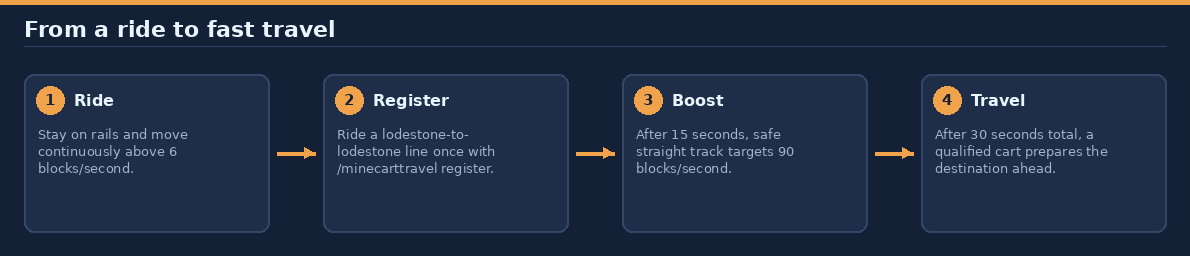
- Place a lodestone at each end of a rail line. At both ends, a flat, straight rail must run directly into the lodestone at the same height.
- Ride a minecart continuously above 6 blocks/second. Defaults: the boost begins after 15 seconds of qualifying travel; a registered line fast-travels after 30 seconds total.
- To enable the automatic transfer, register the line once with
/minecarttravel registerand ride it from one end to the other. - Use
/minecarttravel statusto check your feature choices, qualifying time, and whether the rail is registered.
Both features are on by default. Players can turn either off independently or disable both. No items, crafting, economy, or fees are involved.
Riding and speed boosts
The timer measures actual cart displacement rather than commanded velocity. The cart must be on a rail and move continuously faster than the configured minimum.
| Qualifying ride time | Default behavior |
|---|---|
| Before 15 seconds | Normal minecart movement |
| From 15 seconds | Target 90 blocks/second on safe, straight track |
| From 30 seconds total | Fast travel to the lodestone at the end in the cart's direction, if the line is registered |
Times use game ticks: 300 ticks for boost and 600 ticks for endpoint travel at 20 TPS. Lag makes these waits longer in real time and lowers real-world speed. A new ride's first sample initializes its timer. Stopping, travelling at or below the minimum speed, derailing, dismounting, changing riders, unloading, or external teleporting resets it.
Players keep their boost and fast-travel choices across restarts and reconnects. The timer keeps running when boost is off, so fast travel can still trigger. Turning fast travel off while a destination is being prepared cancels the transfer.
Every minecart variant, including empty and cargo carts, can receive the physical boost. Any player passenger who opted out of boost or lacks minecarttravel.use suppresses the cart's boost. Boosting is disabled for players in normal mode, without permission, dead, or in spectator mode.
Safe speed boost
The 90-block/second target is faster than blue-ice boating's approximate 73 blocks/second only on long, straight, level, clear, loaded track at 20 TPS. It is not an unconditional average-speed guarantee.
Setting boost-speed below roughly 73 blocks/second removes that straight-line speed advantage.
Paper's minecart API is used to set maximum speed and velocity. The safety check requires the configured lookahead of straight, level, supported, loaded rails and one passable block of headroom above each rail. Curves, slopes, endpoints, gaps, unloaded track, nearby entities, unpowered powered rails, and powered activator rails stop boosting; a cart previously boosted is returned to its original maximum speed and its boosted velocity is clamped to at most vanilla speed. Normal powered-rail braking is never overridden.
The physical boost does not load chunks. Carts slow at chunk-loading boundaries until normal player chunk loading catches up. Original maximum speeds are restored on opt-out, dismount, unload, destruction, and plugin shutdown. A persistent recovery marker restores the original speed on the next cart update after an interrupted boosted ride.
Register a fast-travel line
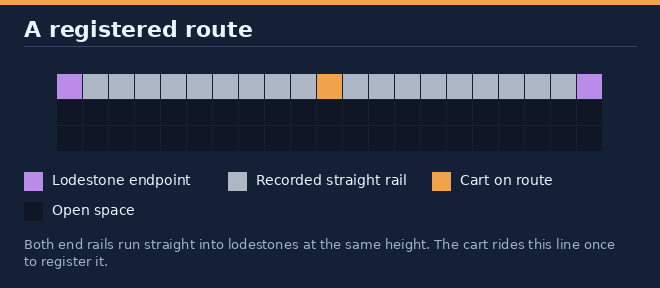
A route must be between two different lodestones in one world. Both endpoint rails must be flat and straight, and run directly into a lodestone at the same height:
lodestone | rail = rail = rail = ... = rail | lodestone
- Run
/minecarttravel registerwhile in a minecart. If not riding, you have 60 seconds to board a minecart on the line. - The cart must be within 16 rails of an endpoint. Recording starts at the nearer qualifying end.
- Ride to the far lodestone. The action bar reports rails and turns recorded.
- When the cart reaches the far endpoint rail, the route registers. Riding it for the fast-travel delay then transfers the cart toward the end in the direction of travel.
The plugin records the rails your cart actually travels over and the switch positions it takes, so junctions and side branches are supported. Boosting remains active during registration, but fast travel is paused for that cart.
Registration fails if the cart leaves the rails, goes backward or takes an ambiguous junction, loops back, stops progressing for 60 seconds, ends without a straight lodestone, returns to its starting lodestone, exceeds 32 turns or slope changes, or exceeds 65,536 rails. Leaving the cart, changing worlds, or logging out cancels registration. Registering a line that overlaps an existing route replaces the older route.
When a route stops working
A route is removed and logged if any registered rail is removed or changes shape, or if either lodestone is removed. Register it again after repairing the line. Normal block changes are monitored (placement, breaking, physics, redstone, fluids, burning, fading, explosions, entity block changes, and pistons), then checked on the next tick.
When a route chunk loads, its rails and lodestones are rechecked. Fast travel will not start from or arrive in a chunk while it is being checked. After edits that bypass block events in loaded chunks, an operator can run /minecarttravel rescan to queue checks in loaded chunks.
Fast travel
A fast-traveling cart must be a rideable minecart with exactly one player passenger. Carts carrying animals, cargo, or additional passengers are not teleported. The passenger must have fast travel enabled and the normal minecarttravel.use permission.
When the timer qualifies on a registered line, the plugin selects the endpoint in the cart's current direction and pauses the cart. It loads only the destination's 3 × 3 chunk area, asynchronously and without generating terrain, with temporary plugin chunk tickets. The rest of the route is not loaded.
The cart and passenger are teleported together using Paper's passenger-retaining teleport behavior. The cart arrives centered over the last rail before the lodestone. Before arrival, the destination must still have its rail, support, headroom, lodestone, an in-border position, and no nearby obstructing entities. Preparation times out after 60 game seconds; tickets are released whether travel succeeds or fails. Tickets are added per chunk as it loads and shared between rides until the last ride releases them.
Travel is cancelled if the route is unregistered, the rider leaves or changes, the cart moves during preparation, chunk loading fails, the destination is unsafe, or another plugin rejects the teleport. A failed attempt resumes saved velocity only if the ordinary straight-track and entity-safety checks pass; it does not retry during that ride. Dismount and re-enter to allow another attempt. Riding an unregistered line produces a one-time hint to register it.
Commands
| Command | Who | What it does |
|---|---|---|
/minecarttravel or /minecarttravel status |
Players; console sees route count | Show choices, qualifying ride time, route status, and registration status |
/minecarttravel boost [on|off] |
Players | Toggle only the speed boost, or explicitly enable/disable it |
/minecarttravel fasttravel [on|off] |
Players | Toggle only fast travel, or explicitly enable/disable it |
/minecarttravel normal |
Players | Turn both features off |
/minecarttravel fast |
Players | Turn both features on |
/minecarttravel register |
minecarttravel.register |
Register the line ridden next |
/minecarttravel register cancel |
minecarttravel.register |
Cancel pending or active registration |
/minecarttravel settings |
Everyone | View current delay and speed settings |
/minecarttravel set <setting> <value> |
minecarttravel.admin |
Change an admin setting live |
/minecarttravel rescan |
minecarttravel.admin |
Recheck registered routes in loaded chunks |
/help minecarttravel |
Everyone | Read this guide in game, with links |
/minecartfasttravel is an alias for /minecarttravel. The base command with no arguments is the same as status for players; the console receives the registered route count.
Permissions
| Permission | Default | Grants |
|---|---|---|
minecarttravel.use |
Everyone | Boost and endpoint fast travel; required for players aboard an enabled cart |
minecarttravel.register |
Everyone | Start or cancel route registration |
minecarttravel.admin |
Operators | Change settings, recheck routes, and view the admin section of /help minecarttravel |
Configuration and admin settings
The four ride settings can be changed live by operators (or anyone with minecarttravel.admin). Changes are saved to plugins/minecarttravel/config.yml and apply on the next update, including to rides in progress.
| Setting | Config key | Default | Valid values |
|---|---|---|---|
boost-delay |
boost-after-ticks |
15 seconds (300 ticks) | 0.05–3600 seconds; shorter than fast-travel delay |
fast-travel-delay |
fast-travel-after-ticks |
30 seconds (600 ticks) | 0.05–7200 seconds; longer than boost delay |
min-speed |
minimum-blocks-per-second |
6 blocks/second | 0.1–8; no higher than boost speed |
boost-speed |
boost-blocks-per-second |
90 blocks/second | At least min speed, at most 120 |
For example: /minecarttravel set fast-travel-delay 60. Enter delay values in seconds; speeds in blocks per second. Values are rejected with an explanation if invalid and no change is made. Raising boost-speed automatically raises safety-lookahead-blocks if required. In-game changes save immediately; manually editing config requires a restart.
The remaining defaults are operational limits and budgets. All are validated at startup; invalid configuration disables the plugin rather than silently substituting values.
| Config key | Default | Valid range | Purpose |
|---|---|---|---|
safety-lookahead-blocks |
12 | Minimum ceil(boost-speed / 20) + 2; maximum 64 |
Straight safe track checked ahead at full speed |
max-route-rails |
65,536 | 2–1,000,000 | Maximum rails recorded in a route |
max-route-turns |
32 | 0–1,024 | Maximum turns or slope changes during registration |
verify-blocks-per-tick |
4,096 | 16–65,536 | Global route verification work budget per tick |
record-steps-per-tick |
512 | 64–4,096 | Global recording work budget per tick |
save-interval-ticks |
600 | 20–72,000 | Save interval when route data has changed (30 seconds at 20 TPS) |
boost-after-ticks: 300
fast-travel-after-ticks: 600
minimum-blocks-per-second: 6.0
boost-blocks-per-second: 90.0
safety-lookahead-blocks: 12
max-route-rails: 65536
max-route-turns: 32
verify-blocks-per-tick: 4096
record-steps-per-tick: 512
save-interval-ticks: 600
In config.yml, both delays are stored as ticks: boost delay must be 1–72,000 ticks and fast-travel delay must be greater than the boost delay and at most 144,000 ticks. The configured speeds must satisfy the bounds above. The first four settings can also be changed with /minecarttravel set; config-file edits to any setting require restart.
Route storage and performance
Routes are saved compactly to plugins/minecarttravel/routes.txt: each straight run of same-shaped rails is one segment, while curves are individual cells. Position lookups use intervals rather than per-rail objects. Changed route data is saved every configured interval and on graceful shutdown, using replace-on-success writes. Corrupt route data or invalid config disables the plugin with a clear server error.
Registration has a global 512 steps per tick budget shared by active registrars. Route verification has a global 4,096 blocks per tick budget. Unrelated block changes are rejected with chunk lookups. There is no world scanning, permanent chunk ticket, or per-rail task.
Install
- Download the latest jar from Hangar.
- Put it in the server's
plugins/folder and restart. The server must run Java 25 and Paper 26.3. - No additional setup is required. Build lodestone endpoints and register each route with
/minecarttravel register.
Upgrading
From 0.2.x, replace the JAR and restart; routes, settings, and player choices carry over. Note that 0.2.3 preserves existing settings, so older saved delay values remain as they are until changed.
From 0.1.x:
- Stop the server and replace the old JAR; do not install both versions.
- Start the server. The existing
config.ymlcan load, but renamed work-budget keys (verify-blocks-per-tickandrecord-steps-per-tick) use their defaults; oldscan-blocks-per-tickandroute-steps-per-tickkeys are ignored. Players who opted into normal mode remain opted out of both features. - Register every fast-travel line again with
/minecarttravel register. 0.1.x routes are not migrated.plugins/minecarttravel/rail-graph.txtis no longer used and can be deleted.
Build from source and publish
./gradlew build # creates build/libs/minecarttravel-0.3.0.jar and runs tests
Gradle runs on Java 17+ and provisions Java 25 when needed; Windows users can use gradlew.bat. Tests use MockBukkit and Paper 26.2 registry data while production compiles against Paper 26.3. Tests cover ride recording (straight, curves, slopes, boosted carts, junctions, limits, failures, and unloaded track), route storage and lookup, invalidation from block changes and chunk loads, admin settings, commands, timing, per-player opt-outs, and travel safety. These tests are not a substitute for a real-server smoke test.
Before production use, smoke-test registration, junction switching on a registered line, 90-block/second straight-line movement, curves, slopes, braking, chunk boundaries, disconnects during preparation, passenger retention, and protection-plugin teleport cancellation on a real Paper 26.3 server. The target speed is configured and tested mathematically; a live-server movement benchmark is not claimed.
Publishing uses HangarMC's official plugin. The Hangar publication reads this README directly, including its absolute raw.githubusercontent.com image URLs; it is the Hangar page description as well as the GitHub guide. Regenerate the original diagrams from the repository root with:
python3 tools/docs/minecarttravel.py
For a release, set a unique version in gradle.properties and supply HANGAR_API_TOKEN with create_version and page-editing permissions. Never commit API keys. Normal builds do not publish.
./gradlew build publishPluginPublicationToHangar syncAllPluginPublicationPagesToHangar \
  -PhangarChangelog="Describe the changes in this release."
The default channel is Release, and the publication targets Paper 26.3. A manual publishing workflow is not required to build or test this plugin.
Links and support
- Source and full guide: GitHub
- Download: Hangar
- Report a bug or request a feature: GitHub issues
Information
Pinned Versions
- R26.3
Pages
Members
1
Owner