
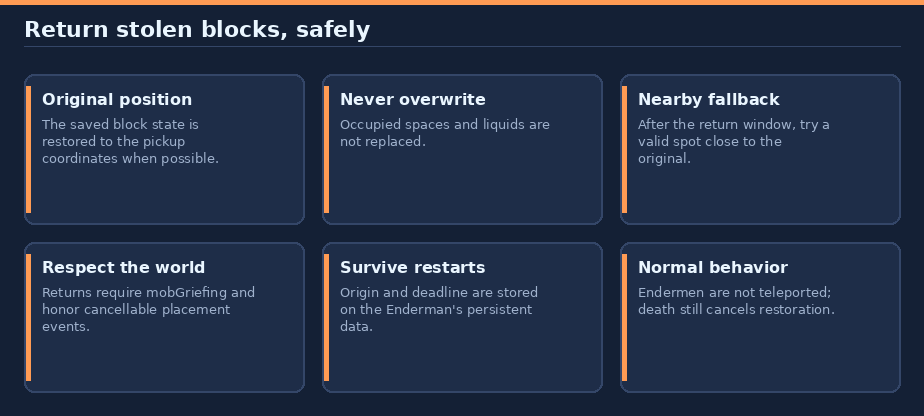
Endermen return stolen blocks to their original spot, with safe nearby placement after 10 seconds of failed attempts.
Reduce Enderman World Damage
Let Endermen borrow blocks, not permanently rearrange your world. They still pick blocks up normally; tracked blocks are returned to their origin when possible, with a nearby fallback if the gap stays unreachable.
For Paper 26.3 and Java 25. No client mod, resource pack, or datapack is required.
In-game guide: use
/help reduceendermanworlddmgfor the concise, color-coded guide. Paper's help output also provides clickable links to the full guide and issue tracker.
Contents
- Quick start
- How returns work
- Return conditions and fallback
- Persistence, limits, and compatibility
- Commands, permissions, and configuration
- Install and upgrade
- Build and publish
- Links and support
Quick start
- Back up the world.
- Install
reduceendermanworlddmg-0.3.0.jarin the server'splugins/folder. - Restart Paper 26.3 with Java 25. No configuration is needed.
How returns work
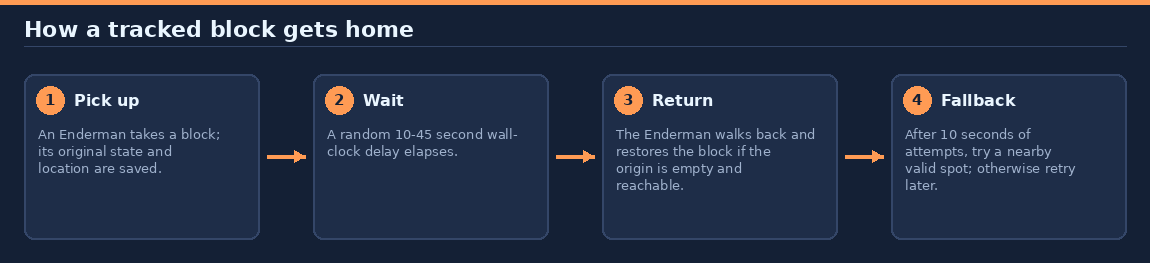
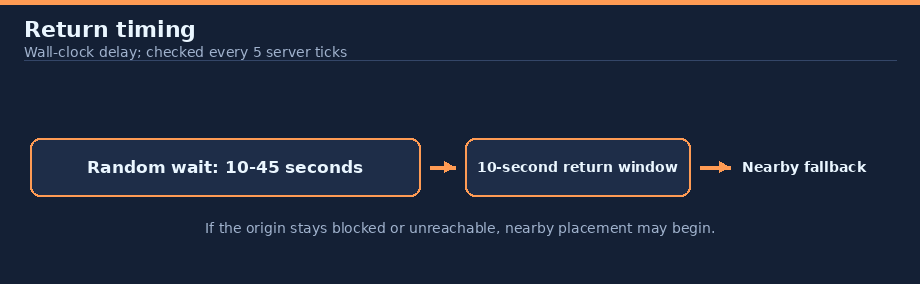
Endermen retain their normal pickup behavior. When an Enderman picks up a block, the plugin stores that block's original state, world, coordinates, and a random 10-to-45-second wall-clock deadline in the Enderman's persistent data. The plugin checks returns every 5 server ticks. The delay is when an attempt can begin, not a guarantee that the block will be back by then; unloaded time counts toward the delay.
When eligible to act, the Enderman walks naturally toward the original position; it is never teleported. The origin must be in the same loaded world, empty, within 3.5 blocks of the Enderman's eyes, visible at some point inside the gap, and not overlapped by the Enderman. If the origin becomes usable after the fallback window begins, it can still receive the block.
Return conditions and fallback
The plugin never replaces an existing block or liquid. A cancellable EntityChangeBlockEvent is fired before every original or fallback placement so protection plugins can veto it. The plugin also rechecks that the target is empty and the Enderman is still carrying the tracked block after event handlers run. A cancelled or invalidated placement is retried.
| Behavior | Details |
|---|---|
| Original return window | The Enderman gets 10 seconds to complete a return after attempts become eligible |
| Nearby fallback area | Within 2 blocks on each horizontal axis; from 1 block below to 2 above its feet |
| Fallback spot checks | Empty, solid ground below, block can be placed, reachable, visible, no overlap, no nearby entities |
| Fallback order | Candidate spots are tried nearest to the original pickup coordinates |
| No valid spot | The Enderman keeps carrying the block and tries again later |
mobGriefing disabled |
Return placement is paused in that world |
If the original chunk is unloaded, the plugin never loads it. The nearby fallback may be used after the return window. If the Enderman is in combat or has AI disabled, return attempts pause; the return window may elapse while it is unable to act. Death cancels restoration and leaves vanilla death drops unchanged. If another action changes the carried block to a different material, the saved return is abandoned.
Persistence, limits, and compatibility
The origin and deadline are stored in the Enderman's persistent data container, so they survive normal entity unload/reload and server restarts. Records from the earlier reduceendermanblockdmg plugin namespace are migrated when loaded. Invalid records are removed without altering the carried block. Disabling the plugin clears in-memory tracking but leaves saved entity data available for a later enable.
Endermen already carrying blocks before the plugin first tracks them are unchanged because their original pickup location is unknown. The plugin does not change the normal pickup itself, force chunks to load, or guarantee a nearby spot exists.
| Item | Behavior |
|---|---|
| Paper | 26.3 |
| Java | 25 |
| Configuration | None |
| Commands / permissions | None |
| Extra plugins | Not required; protection plugins can cancel placement events |
Commands, permissions, and configuration
There are no plugin commands, permissions, or configuration settings. Use /help reduceendermanworlddmg for the in-game guide. The plugin respects the per-world mobGriefing game rule.
Install and upgrade
- Back up the world.
- Download
reduceendermanworlddmg-0.3.0.jarfrom the Hangar project. - Place it in
plugins/and restart Paper 26.3 on Java 25.
When upgrading from reduceendermanblockdmg 0.1.x, remove the old JAR before installing this plugin. Endermen already carrying blocks retain their saved origin records. To uninstall, stop the server, remove this JAR, and restart.
Build and publish
Build from this plugin directory with:
./gradlew build --console=plain
The JAR is written to build/libs/reduceendermanworlddmg-0.3.0.jar. To regenerate the original documentation diagrams from the repository root, run python3 tools/docs/reduceendermanworlddmg.py.
The Hangar publication targets rewrite123/reduceendermanworlddmg, the Release channel, and Paper 26.3. It syncs this README as the Hangar resource page. Create the Hangar project and provide a token with create_version permission through HANGAR_API_TOKEN, then run:
./gradlew build publishPluginPublicationToHangar syncAllPluginPublicationPagesToHangar --console=plain
For later releases, set an unused version in gradle.properties and provide release notes with -PhangarChangelog="...". Normal builds do not publish. Never commit credentials. Generate the original project icon from the repository root with python3 tools/generate-project-icons.py --project reduceendermanworlddmg; icon generation does not upload it.
Links and support
Information
Pinned Versions
- R26.3
Pages
Members
1
Owner