
Skip the night when a percentage or a minimum number of players are sleeping - admins set both in game.
sleepy
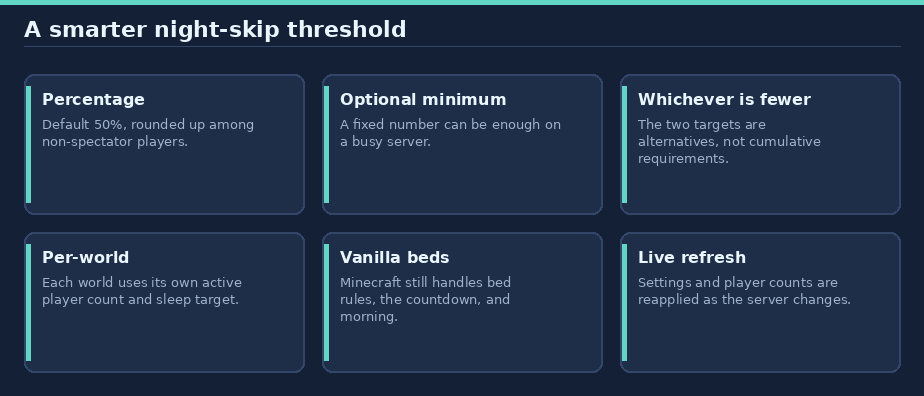
Skip the night when enough players sleep—by percentage, a minimum count, or whichever needs fewer sleepers. Every world gets its own live-adjusted Minecraft sleeping gamerule.
For Paper 26.3 / Java 25, with no runtime dependencies.
In game: use
/help sleepyfor the player guide. Players see status and normal usage; users withsleepy.adminalso see the admin settings. The guide includes clickable links to GitHub and the issue tracker.
Contents
- Quick start
- How the sleeper target works
- Commands
- Permissions
- Configuration
- World behavior and limits
- Upgrading from 0.2.0
- Install
- Links and support
Quick start
- Install the plugin and restart the Paper server. The default rule requires 50% of non-spectator players in each world to sleep.
- Players use beds as usual. Normal Minecraft restrictions still apply.
- Run
/sleepyor/sleepy statusto see the active settings and, in game, how many sleepers are needed in your world. - Operators can optionally set a fixed sleeper floor, for example
/sleepy minplayers 10.
How the sleeper target works
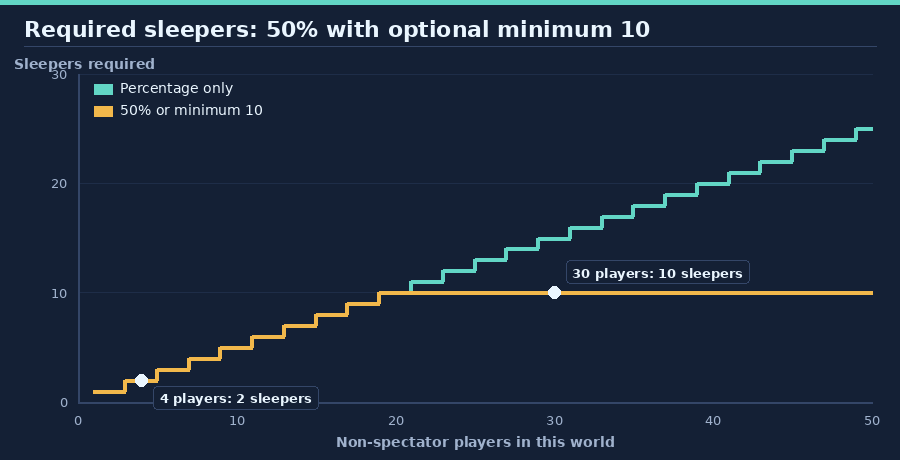
Sleepy compares two targets in each world and uses the one that needs fewer sleepers:
- Percentage target: the configured share of non-spectator players, rounded up. Default: 50%.
- Minimum-player target: a fixed number of sleeping players, default off (
0). When enabled, it is an alternate target, not an additional requirement.
For example, at 50% with a minimum of 10, 4 active players need 2 sleepers; 20 need 10; and 30 need 10. Spectators are excluded. Minecraft always requires at least one sleeper, so 0% does not mean the night skips with nobody in bed.
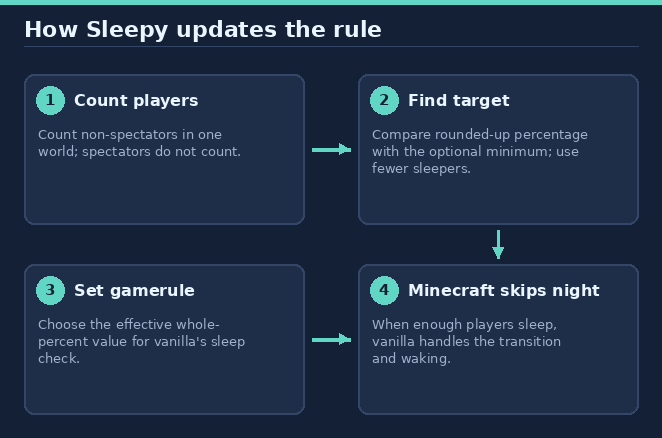
Sleepy calculates the effective whole-number gamerule value that makes Minecraft's built-in night-skip logic use the intended requirement. Minecraft still handles the bed delay, the sleeping-count message, morning transition, weather, and waking players.
Commands
| Command | Who | What it does |
|---|---|---|
/sleepy or /sleepy status |
Everyone | Show the current percentage/minimum and, for a player, this world's required sleeper count. |
/sleepy percent <0-100> |
sleepy.admin |
Change the percentage and save it immediately. |
/sleepy minplayers <number|off> |
sleepy.admin |
Change the minimum; off or 0 disables this target. |
/help sleepy |
Everyone | Open the in-game guide and clickable source/support links. |
Commands are registered with the /sleepy name. The status subcommand is optional; /sleepy alone displays the same status.
Permissions
| Permission | Default | Grants |
|---|---|---|
sleepy.admin |
Operators | Change the sleeping percentage and minimum; view the admin help section. |
The status command is available to all players. Admin commands save into plugins/sleepy/config.yml, apply immediately to loaded worlds, and are reapplied as worlds load. Changes also refresh on bed entry and every second so joins, quits, deaths, and game-mode changes are reflected.
Configuration
The plugin creates this file on first start:
| Key | Default | Valid values | Description |
|---|---|---|---|
sleeping-percentage |
50 |
Whole number 0–100 |
Percentage of non-spectator players who must sleep. Minecraft still requires at least one sleeper. |
min-sleeping-players |
0 |
Whole number 0 or greater |
Alternate fixed sleeper target; 0 disables it. |
Example:
sleeping-percentage: 50
min-sleeping-players: 0
Use /sleepy percent <0-100> and /sleepy minplayers <number|off> for immediate saved changes. If an out-of-range value is present at startup, Sleepy logs a warning and uses the default for that value. Manual changes can also be applied by restarting the server.
World behavior and limits
- The requirement is per world, not pooled across the server. Spectators do not count; all other game modes count as active players.
- Sleepy manages only the vanilla
playersSleepingPercentagegamerule. It does not change weather or other game rules. Other plugins that modify the same gamerule may conflict. - Values are refreshed on world load, after a bed-entry event, and once per second.
- For more than 100 active players in one world, the gamerule's whole-percent steps may make the configured minimum one or two players easier to reach, never harder.
- Normal Minecraft bed rules remain in effect, including unsafe beds in the Nether and End.
- Minecraft saves each world's gamerule. After removing Sleepy, its last value remains; to restore vanilla behavior, remove the plugin and set
playersSleepingPercentageto100in each world. While Sleepy is enabled it manages this gamerule, so use/sleepy percentrather than/gamerule.
Upgrading from 0.2.0
Stop the server, replace the old JAR with sleepy-0.3.0.jar, and restart. The plugins/sleepy/config.yml settings remain compatible; no migration is needed. Existing settings continue to apply.
Install
- Download
sleepyfrom Hangar. - Place
sleepy-0.3.0.jarin the server'splugins/directory and restart. - Run Paper 26.3 with Java 25. Give
sleepy.adminonly to users who should change server-wide sleep behavior.
Links and support
- Source and full guide: GitHub repository
- Download: Hangar project
- Report a bug or request a feature: GitHub issues
Build from source and publish
./gradlew build --console=plain
Copy the resulting jar from build/libs/. Gradle runs on Java 17+ and provisions a Java 25 toolchain if needed. Tests use MockBukkit's available 26.2 registry harness while production compiles against Paper 26.3; test runs do not replace an in-game smoke test on Paper 26.3.
Publishing uses HangarMC's Gradle publishing plugin. Set a unique version in gradle.properties and provide a Hangar key with create_version and edit_page permissions through HANGAR_API_TOKEN. Never commit API keys.
./gradlew build publishPluginPublicationToHangar syncAllPluginPublicationPagesToHangar \
  -PhangarChangelog="Describe this release"
This README is synced as the Hangar project page. Regenerate its original diagrams from the repository root with python3 tools/docs/sleepy.py. A normal build does not publish anything.
Information
Pinned Versions
- R26.3
Pages
Members
1
Owner