
Allow player to /vote on important actions: Server restarts, render distance, game diff, player timeouts, etc...
votersrights
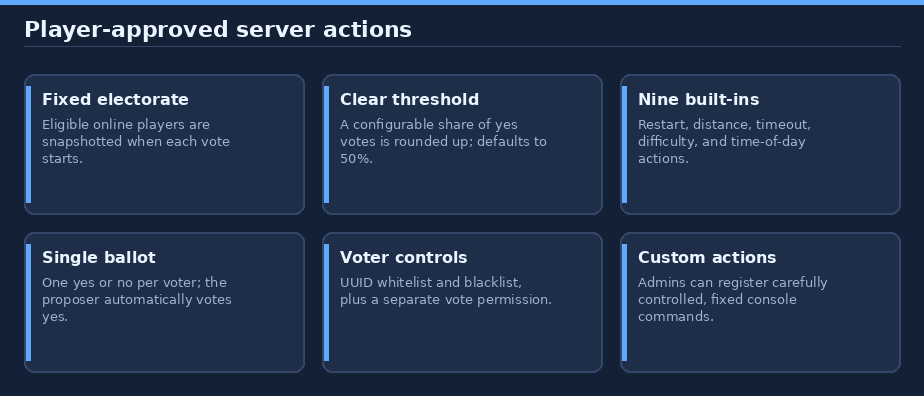
Let eligible players approve server actions together. One proposal at a time, clear thresholds, configurable voter lists, and optional custom vote actions.
Built for Paper 26.3 / Java 25. No runtime dependencies.
In game: use
/help votersrightsfor the full guide. Players see voting help; users withvotersrights.adminalso see the admin commands and settings. The guide ends with clickable links to GitHub and the issue tracker.
Contents
- Quick start
- Voting rules
- Built-in actions
- Commands
- Permissions and eligibility
- Admin settings
- Custom vote actions
- Saved actions and limitations
- Install
- Links and support
Quick start
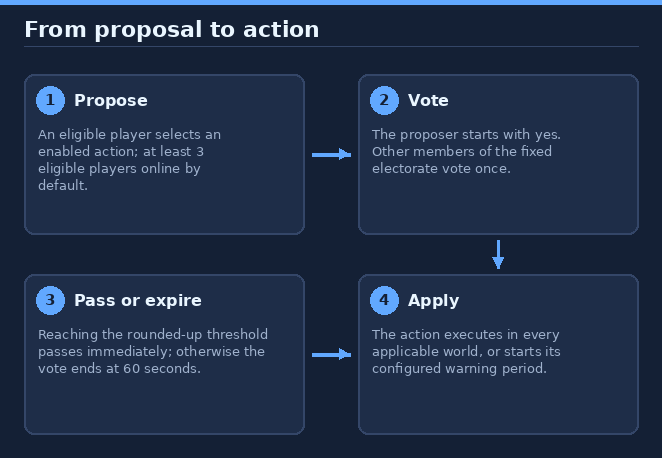
- Ensure the required number of eligible players is online (default: 3).
- A player runs
/vote setTimeNightor another enabled action. The proposer automatically casts a yes ballot. - Other eligible players run
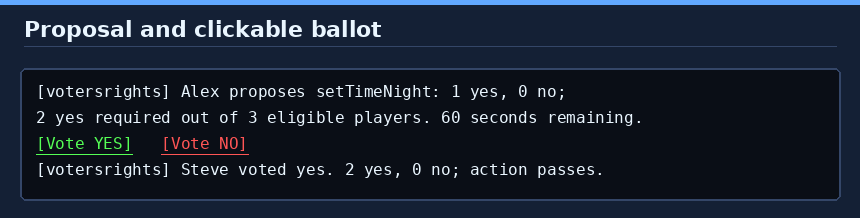
/vote yesor/vote no, or click the vote buttons in chat. - The action runs as soon as yes votes reach the configured threshold. If it does not pass in 60 seconds, the vote fails.
Use /vote at any time to see the current tally or, when no vote is active, the enabled actions.
Voting rules
- Only one server-wide vote can be active. It lasts 60 seconds.
- The eligible online players at the start form a fixed electorate. Joining later does not add a voter; leaving does not remove a ballot. A voter who reconnects can still cast a ballot if they have not voted already.
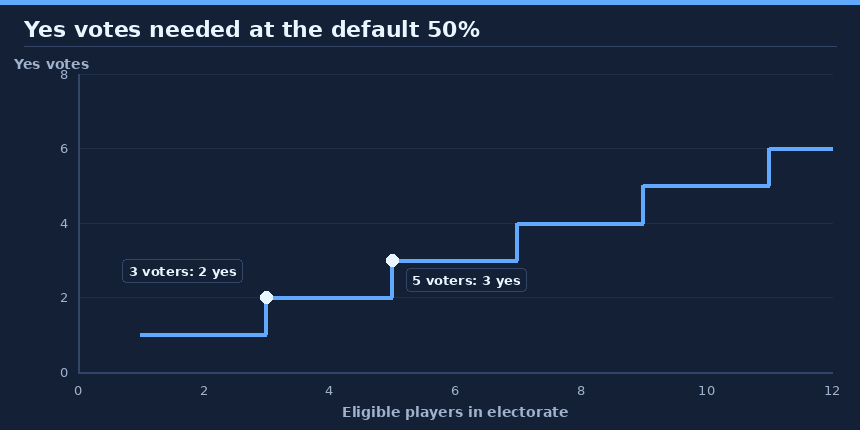
- The default threshold is 50% of the electorate, rounded up. For example, 2 yes votes are needed out of 3 or 4, and 3 out of 5. Abstentions are not yes votes.
- Each eligible voter can submit one ballot. Votes cannot be changed. The proposal creator automatically votes yes.
- Votes are checked once per second as well as on ballot changes; a vote ends immediately when it passes, otherwise at expiry.
- A passed restart or timeout enters a warning period. No new vote can start until that pending action begins.
- Successful admin edits and reloads cancel an active vote. Passed delayed actions remain saved.
Built-in actions
Names are case-insensitive. Tab completion lists currently enabled actions.
| Proposal | What happens after it passes |
|---|---|
/vote restart |
Waits 2 minutes, then dispatches Paper's console restart command. Default cooldown is 20 minutes after execution. |
/vote lowerViewDistance |
Lowers every world's view distance by 2 chunks, clamped to configured limits. |
/vote increaseViewDistance |
Raises every world's view distance by 2 chunks, clamped to configured limits. |
/vote lowerSimulationDistance |
Lowers every world's simulation distance by 2 chunks, clamped to configured limits. |
/vote increaseSimulationDistance |
Raises every world's simulation distance by 2 chunks, clamped to configured limits. |
/vote timeout <online-player> |
Gives the target a 30-second warning, then disconnects them for the configured duration. |
/vote difficulty <difficulty> |
Sets the chosen allowed difficulty in every world. Defaults: easy, normal, hard. |
/vote setTimeDay |
Sets every world's time to 1000. |
/vote setTimeNight |
Sets every world's time to 13000. |
Distance votes change current world settings, not server.properties or Paper configuration files; server settings can restore distances after a restart. Per-player/client limits may still reduce what a player sees. A distance proposal is rejected if no world would change. If a world's current distance is outside the configured range, the next vote clamps it into range, potentially moving farther than two chunks or correcting in the opposite direction.
Commands
| Command | Who | Purpose |
|---|---|---|
/vote |
Eligible players | Show active vote status or list enabled actions. |
/vote <action> |
Eligible players | Propose an action with no arguments. |
/vote timeout <online-player> |
Eligible players | Propose timing out a visible, online player. |
/vote difficulty <difficulty> |
Eligible players | Propose an allowed difficulty. |
/vote yes or /vote no |
Eligible electorate | Cast a one-time ballot on the active proposal. |
/votersrights [show] |
Admins or console | Display the complete current configuration. |
/votersrights set <setting> <value> |
Admins or console | Change a numeric setting or whitelist-enabled. |
/votersrights allow <action> <true|false> |
Admins or console | Toggle a built-in or custom action. |
/votersrights difficulties <difficulty...> |
Admins or console | Replace the allowed difficulty list. |
/votersrights whitelist [add|remove <player|UUID>] |
Admins or console | View or edit voter allow-list UUIDs. |
/votersrights blacklist [add|remove <player|UUID>] |
Admins or console | View or edit excluded voter UUIDs. |
/votersrights action add <name> <console command...> |
Admins or console | Add a custom vote action command; repeating appends another command. |
/votersrights action remove <name> |
Admins or console | Remove a custom action. |
/votersrights reload |
Admins or console | Reload config.yml; cancels an active vote after successful validation. |
/help votersrights |
Everyone | Open the in-game guide and clickable source/support links. |
Admin commands require votersrights.admin when run by a player. Configuration changes are validated before saving and applying; failed saves or invalid settings leave active settings unchanged and errors are reported. show prints the full configuration, including action toggles and custom commands.
Permissions and eligibility
| Permission | Default | Grants |
|---|---|---|
votersrights.vote |
Everyone | Propose actions and cast ballots, if voter-list rules allow. |
votersrights.admin |
Operators | Change settings, manage voter lists/actions, reload, and see the help admin section. |
Blacklist always takes precedence. When whitelist-enabled: true, a player must also be in the whitelist. The votersrights.vote permission is still required even when listed. Both lists store UUIDs; admin commands accept an online name, a locally cached name, or a UUID. There is no remote name lookup.
Admin settings
Admin commands write to plugins/votersrights/config.yml and apply immediately. Manual edits require /votersrights reload. Configuration must use the correct types and values; invalid startup configuration prevents the plugin from enabling, while a failed reload keeps the previous active settings.
| Setting | Default | Valid values and effect |
|---|---|---|
pass-percentage |
50 |
Whole number 1–100; yes votes required as a percentage of the fixed electorate, rounded up. |
minimum-online-players |
3 |
Whole number 1 or greater; eligible online players needed to start a vote. |
restart-cooldown-minutes |
20 |
0–525600; cooldown begins when the delayed restart executes. |
timeout-duration-minutes |
3 |
1–525600; time a player cannot reconnect after the warning. |
timeout-protection-minutes |
30 |
0–525600; protection begins when a timeout ends, not when the player reconnects. |
minimum-view-distance |
6 |
2–32 chunks, and no greater than the maximum. |
maximum-view-distance |
18 |
From the configured minimum through 32 chunks. |
minimum-simulation-distance |
4 |
2–32 chunks, and no greater than the maximum. |
maximum-simulation-distance |
12 |
From the configured minimum through 32 chunks. |
allowed-difficulties |
[EASY, NORMAL, HARD] |
Non-empty list; PEACEFUL can be added. Replaced by the difficulties command. |
whitelist-enabled |
false |
true requires a player's UUID to be in whitelist. |
whitelist |
[] |
UUID list; only used when whitelist mode is enabled. |
blacklist |
[] |
UUID list; excluded even if whitelist mode is disabled or they are listed. |
actions.* |
All true |
Toggle for each of the nine built-in actions listed above. |
custom-actions |
{} |
Named fixed console commands; each action has an enabled flag and non-empty commands list. |
Distance lower and upper bounds must be coordinated: raise the maximum before raising the minimum above it; lower the minimum before lowering the maximum below it. Successful setting changes cancel an in-progress vote. Existing timeout durations and protection windows are not retroactively changed; a queued restart uses the cooldown setting in effect when it executes.
Custom vote actions
Administrators may expose fixed console commands as player-votable actions. For example:
/votersrights action add announcement say The players have voted!
/vote announcement
/votersrights allow announcement false
/votersrights action remove announcement
The first command makes an enabled announcement action. A passing proposal executes the command as the console. Repeating action add appends another command and all commands run in order. The equivalent configuration is:
custom-actions:
  announcement:
    enabled: true
    commands:
      - "say The players have voted!"
Names must start with a lowercase letter, use only lowercase letters, digits, _ or -, and be at most 32 characters. Built-in action names and yes/no are reserved. Commands must be fixed text, without a leading slash, line breaks, braces/placeholders, or player-supplied arguments. Only add trusted commands: these run with console privileges and can intentionally bypass built-in safeguards. If a command is unhandled, execution stops with an explicit failure; already-run commands are not rolled back. A command handler that reports success is responsible for its actual outcome.
Saved actions and limitations
Restart warnings, cooldown timestamps, and timeout/protection records are saved atomically in plugins/votersrights/state.yml and survive server restarts. They use wall-clock time. A pending warning resumes from its original deadline; an overdue restart executes on the next scheduler tick. The restart cooldown is saved before dispatching the native console restart command. Configure and test your Paper restart script or host first: an unhandled restart is reported, but this plugin cannot make a host restart if its setup does not support the command, and the cooldown remains in place.
Timeouts use UUID state and do not change or overwrite the server ban list. Logging out during the 30-second warning does not avoid the timeout. The target must still be online when the vote passes; the timeout prevents login for its duration. Protection starts at the end of the timeout, whether or not the player reconnects. There is no automatic immunity for admins.
Install
- Download
votersrightsfrom Hangar. - Put
votersrights-0.2.0.jarinto the Paper server'splugins/directory and restart. - Java 25 is required by the server. Grant
votersrights.adminonly to trusted administrators; review custom console commands carefully.
Links and support
- Source and full guide: GitHub repository
- Download: Hangar project
- Report a bug or request a feature: GitHub issues
Build from source and publish
./gradlew build --console=plain
Copy the resulting jar from build/libs/. Gradle runs on Java 17+ and provisions Java 25 for compilation if needed. MockBukkit tests validate the plugin behavior but do not replace a multiplayer smoke test or a host restart test.
Publishing uses HangarMC's Gradle plugin. Set a unique version in gradle.properties and provide an API key with create_version and edit_page permissions via HANGAR_API_TOKEN; never commit the key.
./gradlew build publishPluginPublicationToHangar syncAllPluginPublicationPagesToHangar \
  -PhangarChangelog="Describe this release"
This README is synchronized as the Hangar project page. Regenerate the original diagrams with python3 tools/docs/votersrights.py from the repository root. A normal build does not upload to Hangar.
Information
Pinned Versions
- R26.3
Pages
Members
1
Owner