

Advanced JukeBox / Music - Plugin
General Overview:
**This is a huge JukeBox, Music & Note Block Plugin!
GMusic, is a highly customizable Plugin which allows you to play your favorite Songs in Minecraft with Note Block Sounds. There is a nice looking GUI which allows you to change the current playing Song, the Volume, Shufflemode and more! There are a lot of Settings and Functions which can all be changed by you in the Plugin-Config and the Lang-Files!**
**Supports Bukkit, Spigot & Paper-Servers from 1.13 to 26.3
You don't need any API or other Plugin to get GMusic to work!
**If you like my Plugins and Libraries please support me by leaving a good review
=============================================================================
Special Features:
Highly customizable! Very good performance
Easy to use Commands! Tab-Complete
Play Note Block Songs in Minecraft!!
( /music ) Music-GUI
Convert ".mid" or ".midi" Files directly with GMusic without any other Software!!
Stop, Pause, Resume Songs!
Play Random Songs!
Reverse-Play a Song!!
Actionbar Messages!
Search for Songs by the Songtitle!

Active Welcome GMusic to get resumed your last Song from the Server, or a random Song if you haven't heard anything before.
Smart GUI-Page Features
Change all Options while playing a Song!
(Volume, Playmode (Once;Shuffle;Repeat), Particles, Reverse)

Show Particles sync with the playing Song!
Define Default Play-Settings!
Prevent saving of Options when a Player quits the Server, so he starts with Default-Settings when he join again. Smart File-Saving!
Mark your favorite Songs and play them with the "Favorites"-Playlist!
Ingame Song Edit Command!
Server Song-Shuffle Radio!
Environment-Effects!!
GMusic supports Environment-Music-Effects!
For example if you are underwater your Music-Volume is damped and slightly distorted!
Middle Click a Option to reset to its default Value!
There is PlaceholderAPI Support!
Placeholders from GMusic:
gmusic placeholders
- %gmusic_option_volume% -> Shows the current volume
- %gmusic_option_join% -> Shows the current welcome music state
- %gmusic_option_playmode% -> Shows the current playmode
- %gmusic_option_particles% -> Shows the current particle state
- %gmusic_option_reverse% -> Shows the current reverse mode state
- %gmusic_option_toggle% -> Shows if the player can hear JukeBox music
- %gmusic_playing% -> Shows if a players hears music
- %gmusic_playing_title% -> Shows the title of the current playing song
- %gmusic_playing_id% -> Shows the id of the current playing song
- %gmusic_playing_author% -> Shows the author of the current playing song
- %gmusic_playing_original_author% -> Shows the original author of the current playing song
- %gmusic_playing_description% -> Shows the description of the current playing song
- %gmusic_playing_paused% -> Shows if the current playing song is paused
=============================================================================
Jukeboxes and Discs
You can give Players a special JukeBox, which can play all Songs from the Block Position!


If you near a JukeBox you can hear the Music!
The further you move away from the JukeBox, the quieter the Music becomes!
You can customize the Range in the Config!
Players can toggle, whether they can hear a JukeBox by "/music toggle"
You can give your Players all Songs as a Music-Disc!
This Discs work like normal Vanilla-Minecraft Discs, and can be put in a normal JukeBox!
Example Song Discs:


=============================================================================
NBS and GNBS / Convert Songs / Import Songs into the Plugin
"How do I import Songs into GMusic?"
First of all: GMusic uses a unique File-Type named ".gnbs" to read and play Songs!
If you have a ".gnbs" file you can put this in the "gnbs" Folder and reload the Plugin. Now your Songs is imported and can be played!
When you have a ".nbs" File (in most cases you have this) you can drop this File in the "convert" Folder and GMusic does the rest (converting, importing, etc.) for you!
"Where can I find a '.nbs' or '.gnbs' File?"
To get a ".nbs" or ".gnbs" File you can simple search in the Internet for them.
There are also whole Song-Lists: [Click here and scroll down]
"I have an '.mp3', '.mid' or '.midi' File, how can I use it with GMusic?"
Currently GMusic can't directly read ".mp3" Files because this needs a huge amount of work!
To convert a ".mid" or ".midi" File just put it in the "convert" folder as well! GMusic now converts the File with the next Reload!
If you like to convert a ".mid" or ".midi" File by yourself you can use Note Block Studio to convert them into ".nbs" Files. This Files you can take to the "convert" Folder!
"What is special about '.gnbs' Files?"
The new ".gnbs" Format offers several advantages.
With this Format, individual Notes can be stopped and interrupted. This provides completely new Playback-Options.
In addition, "Parts" can be created, which can be called up again and again within the File, and individual Lines can be played repeatedly.
This Format is not encrypted or is illegible. You can simply open and view these Files with a Text Editor!
=============================================================================
Commands:
[INDENT]/music play -> Play a Song by ID /music playing -> Returns the current playing Song /music random -> Play a random Song /music stop -> Stops the current playing Song /music pause -> Pause the current playing Song /music resume -> Resume the last paused Song /music skip -> Skip to the next Song /music toggle -> Toggle the Ability to hear Jukeboxes
/amusic download -> Downloads a File from a URL /amusic jukebox [] -> Gives a Player a specific amount of Jukeboxes /amusic disc [] -> Gives a Player a specific amount of a Song-Disc /amusic radio -> Open the server radio /amusic play -> Play a Song by ID /amusic playing -> Returns the current playing Song /amusic random -> Play a random Song /amusic stop -> Stops the current playing Song /amusic pause -> Pause the current playing Song /amusic resume -> Resume the last paused Song /amusic skip -> Skip to the next Song /amusic toggle -> Toggle the Ability to hear Jukeboxes
/gmusicreload -> Reloads all Config-Settings & Language-Files[/INDENT]
Permissions:
Music-Permissions (Default-Permissions marked Underlined):
GMusic.Music.* -> Contains all Music-Permissions** *** GMusic.Music -> Use "/music"** *** GMusic.Music.Play -> Use "/music play"
GMusic.Music.Playing -> Use "/music playing"
GMusic.Music.Random -> Use "/music random"
GMusic.Music.Stop -> Use "/music stop"
GMusic.Music.Pause -> Use "/music pause"
GMusic.Music.Resume -> Use "/music resume"
GMusic.Music.Skip -> Use "/music skip"
GMusic.Music.Toggle -> Use "/music toggle"
AdminMusic-Permissions:
GMusic.AdminMusic.* -> Contains all AdminMusic-Permissions
GMusic.AdminMusic -> Use "/adminmusic"
GMusic.AdminMusic.Play -> Use "/adminmusic play"
GMusic.AdminMusic.Playing -> Use "/adminmusic playing"
GMusic.AdminMusic.Random -> Use "/adminmusic random"
GMusic.AdminMusic.Stop -> Use "/adminmusic stop"
GMusic.AdminMusic.Pause -> Use "/adminmusic pause"
GMusic.AdminMusic.Resume -> Use "/amusic resume"
GMusic.AdminMusic.Skip -> Use "/adminmusic skip"
GMusic.AdminMusic.Toggle -> Use "/adminmusic toggle"
Interaction-Permissions:
- GMusic.JukeBox -> Use the custom JukeBox
- GMusic.Disc -> Use the custom Disc [/INDENT]
Kown Bugs / Issues:
There are currently no known or not fixed Issues!
If you discover any kind of Bug please instantly contact me in the Discussion-Area, send me a DM or join the GPlugins Discord Server, so i can fix this as soon as possible! [/INDENT]
New Features:
Language-Files:
- Set the "Lang.lang"-Option in the config.yml to your chosen Language
Add a new Language-File:
- Copy one of the Language-Files and name it like you will
- Change the Messages in the Language-File
- Set the "Lang.lang"-Option in the Config.yml to your created Language-File [/INDENT]
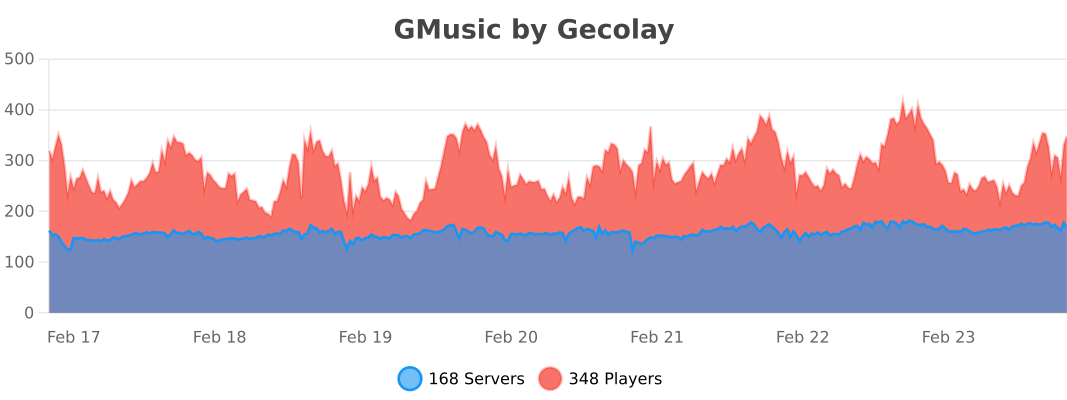
Stats:
=============================================================================

New official GPlugins Discord Server!
This Plugin supports the Minecraft-Versions: ### 1.13, 1.14, 1.15, 1.16, 1.17, 1.18, 1.19, 1.20, 1.21, 26.x
If you like my Plugins and Libraries please support me by leaving a good review!
Pinned Versions
- R1.13–26.3
Pages
Members
1
Owner